💡 Start Your Online Business Today

🚀 Ready to Build Your Online Business?
👉 Start Here with This FREE Guide!

Sunday, February 25, 2024

The 10 Most Popular Trending AI Apps in the GPT Store (Feb 2024)

I’m overwhelmed. 

The modern world is an avalanche of choices. 

Take groceries for example. Just go shopping for cheese and there is a whole aisle of options. And that’s just the cheddar.

Don’t get me started on the yogurt. Low fat vs full cream… and now we have non-dairy.  I am just waiting for the gluten free option. But I am sure there is a product or an “app” for that.

But this deluge of decisions isn’t confined to the physical realm.

If I want to choose an app from the Apple store on how to get fit, meditate or find a hot date, I open a pandora’s box of hundreds of options, each claiming to be the exact solution I need.

And it doesn’t end there. Following close behind the cavalcade of grocery and app choices are the hundreds of new streaming options; from Netflix to Disney+ to Amazon Prime and more.

Sometimes I feel like screaming and want to run for the nearest door. 

The AI app firehose

Trying to select and choose from all the available options is like trying to drink from a fire hose. 

Things only get more complicated in the world of AI, particularly with the recent launch of the OpenAI GPT Store. Here you have 3 million apps designed to help you scale your business, improve your personal productivity, and maybe even optimize your creativity. And I am just scraping the surface.

At times I feel like retreating to a monastery, throwing my phone in the river, shutting down the computer, and screaming at the moon. 

So to prevent you from becoming a quivering mess paralysed by indecision, I am going to select a few options that will save you some time and maybe your sanity. Or save you from uttering a profanity.

To help you make sense of the ChatGPT universe, lets take a look at some of the custom apps spawned from the technology and demystify what’s truly worth your attention.

What is a Custom GPT App?

ChatGPT is like a swiss army knife. It tries to be Jack of all trades but master of none.

It is a generic and general AI tool (chatbot) that does many general tasks to augment and amplify our humanity; including research, writing, creativity and marketing. 

Custom ChatGPT apps are built for a single purpose. 

These include:

  • Convert text to video
  • Convert text to images
  • Create a marketing strategy
  • Turn data into visualizations
  • And… much more

So…What are some of the most interesting and popular AI apps that are in the vast GPT Store universe? 

If you go to the GPT Store it has a friendly minimalist user interface that doesn’t work as well as it should. 

So there is a problem. Well surely there is an app for that?  

The GPT Store problem 

The user interface (or in technical terms “UX”) is not user friendly. It looks like it was built by engineers for engineers and not humans. Maybe it was built by AI for AI. Maybe this is the start of artificial intelligence taking over the world? 

In a recent post by UX planet it mentions some of the issues that make the GPT Store a UX disaster.

Problem #1

The first problem that we face is category selection. It’s unclear why Dall-e, Writing, Productivity, Research & Analysis are selected as the top-level categories. There are no categories like Finance, Travel, or Health.”

Problem #2

The naming of categories inside the GPT Store is a bit confusing too. The category “Dall-E” is basically image generation, but it has the name of the tool rather than the action that the user wants to perform using it.

Problem #3

The user interface for search is keyword driven rather than analyzing your intention. When you say finance advisor, I want to see a list of finance apps. 

But “Tech Support Advisor” or “Jo Ellen Mathews” results look irrelevant to your goal.

Maybe we need to be kind. It is their first attempt at creating an App store for AI after all. 

An app to find an app

To help your decision making there is an “App” to find GPT Apps. It is called GPTStore.ai.

It looks like and smells like the GPT store but it isn’t. And they do add a disclaimer saying that they are not the Official OpenAI store (in small letters at the bottom).  

They have 50 categories listed at the time of writing.

The 5 most popular apps according to the ChatGPT community

Looking at what is trending gives you insight into humanity. The GPT store lists 12 of the most popular “Trending” apps. That tells us a bit about why people are using ChatGPT and how they are using “Generative AI”. 

The majority of the apps in this store are created by new companies trying to break into this high velocity trend. Then there are mature companies such as “Canva” that are adding new AI tools and weaving AI into their existing products.

#1: Image Generator

This app has been created by Naif J Alotaibi. 

App description 

“A GPT specialized in generating and refining images with a mix of professional and friendly tone.”

Prompt and image

He provides some ready to go prompts. Here is one “Design an image of a futuristic city”.

Another standard prompt is “Illustrate a scene from a fantasy novel”

#2: Canva

Canva is a multi billion dollar company that specializes in helping to make it easy to create professional designs and to share and print them.

They saw the complexity of Adobe Photoshop and democratized visual design. 

App description: 

Effortlessly design anything: presentations, logos, social media posts and more.

Prompt and Image

Inspirational quote graphic for social media. The quote “You only live once”

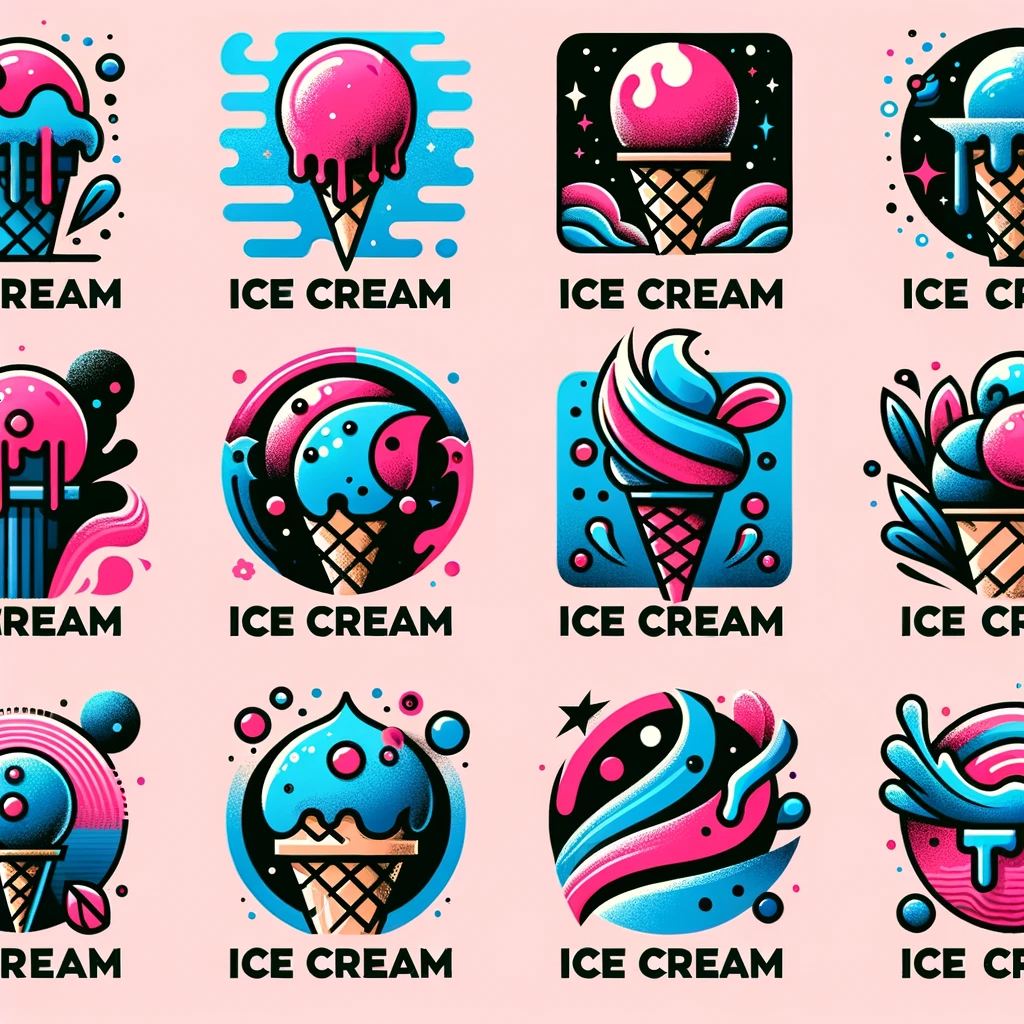
#3. Logo Creator

This app was created by Chase Lean. 

App description: 

Use me to generate professional logo designs and app icons.

A standard app prompt 

Generate me some logos featuring an ice cream.
#4. Consensus

Consensus is a search engine that uses AI to find insights in research papers. 

App description 

Your AI Research Assistant. Search 200M academic papers from Consensus, get science-based answers, and draft content with accurate citations.

Prompt and result

Prompt: “Draft a blog on the science-backed benefits of mindfulness”. Here is the blog post result from the prompt:

The Science-Backed Benefits of Mindfulness

Mindfulness, a practice of maintaining a non-judgmental state of heightened or complete awareness of one’s thoughts, emotions, or experiences on a moment-to-moment basis, has been extensively studied and linked to numerous health benefits. Here, we explore some of the key findings from recent research:

Improvement in Mental Health: 

Mindfulness meditation has been shown to reduce symptoms of stress, anxiety, and depression. It helps in cultivating a state of nonjudgmental awareness of the present moment, which enhances emotional regulation and contributes to overall well-being (Cavanagh et al., 2013)

Enhancement of Cognitive Performance

Regular mindfulness practice is associated with improvements in cognitive functions such as attention, memory, and executive functioning. This is thought to be due to the positive effects of mindfulness on brain areas related to these cognitive processes (Yi-Yuan Tang, Britta K. Hölzel, & M. Posner, 2015)

Promotion of Prosocial Behavior

Mindfulness not only benefits the individual practicing it but also has a positive impact on their interactions with others. Research has found that mindfulness is linked to increased prosocial behaviors, including empathy and compassion, which can improve interpersonal relationships and social connectedness. (James N. Donald et al., 2018)

Improvement in Physical Health

Mindfulness practices have been associated with better physical health outcomes, including lower blood pressure, improved immune function, and reduced chronic pain. These benefits are believed to result from the stress-reducing effects of mindfulness meditation. (D. Black & George M. Slavich, 2016).

Enhanced Emotional Regulation: 

Mindfulness aids in the regulation of emotions by promoting an attitude of acceptance towards one’s current experience, which can reduce the intensity of negative emotions and improve emotional stability (L. Roemer, S. K. Williston, & L. Rollins, 2015).

#5: Cartoonize Yourself

This is by App by https://www.karenxcheng.com/

Description

Turns photos into Pixar-style illustrations. Upload your photo to try.

The prompt and the result

Upload a photo for a Pixar transformation

#6: Write for Me

This has been developed by Puzzletoday.com.

 Description:

Write tailored, engaging content with a focus on quality, relevance and precise word count.

Prompt:

Write me a 200 word product description for a red screwdriver. 

Response:

“Introducing our premium red screwdriver, the ultimate tool designed for both professional tradespeople and DIY enthusiasts alike. This ergonomically crafted screwdriver stands out with its vibrant red handle, not just for its aesthetic appeal but for its practicality in ensuring the tool is easily spotted in a cluttered toolbox or busy workbench.

Constructed with durability in mind, the screwdriver features a high-quality, chrome-vanadium steel shaft that guarantees longevity and resistance to corrosion. The tip is precisely machined for a perfect fit with screws, minimizing the risk of stripping or damaging screw heads, ensuring your work is always neat and efficient.

The handle is designed with comfort and grip in mind, made from a tough yet comfortable material that reduces hand fatigue during prolonged use. This design ensures that whether you’re tightening a screw or loosening one, your grip remains secure and your hand stays comfortable.

This red screwdriver isn’t just a tool; it’s a reliable partner for all your construction, repair, and maintenance projects. Its combination of striking design, exceptional durability, and ergonomic comfort makes it a must-have in any toolkit.

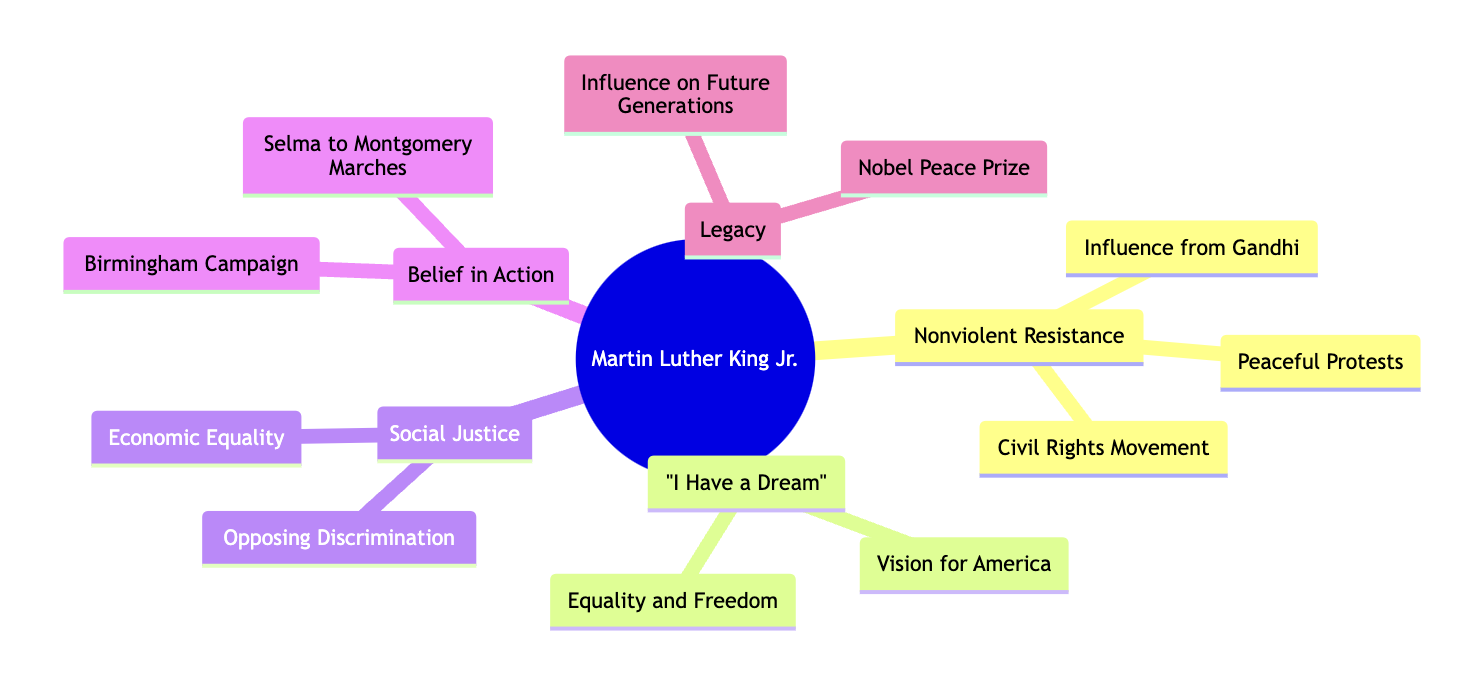
#7:  Diagrams: Show Me

This is developed by helpful.dev.

Description:

Create Diagrams, Architecture Visualisations, Flow-Charts, Mind Map, Schemes and more. Great for coding, presentations and code documentation. Export and Edit your diagram for free!

Prompt:

Mindmap of Martin Luther King Jr. ideas
#8: Humanizer Pro

This app is by charlygpts.com

Description:

#1 Humanizer in the market. Writes text like a human, avoiding AI detection. This tool humanizes your content to bypass the most advanced AI detectors, maintaining content meaning and quality. 

The result:

“It’s not even controversial to argue that many Americans need a thicker web of relationships. And yet, the single romantic relationship continues to be held up as the key to fulfillment by the cultural ideal”.

#9: Video GPT by VEED

This app is by veed.io

Description:

AI Video Maker. Generate videos for social media – YouTube, Instagram, TikTok and more! Free text to video & speech tool with AI Avatars, TTS, music, and stock footage.

The questions to produce the video

For your video project, are you interested in using a text-to-speech (TTS) voiceover? If so, you can choose between a male or female voice. This TTS feature will narrate your video script, providing a clear and engaging voiceover for your content.

Could you share more about your video project? Specifically:

  • What is the primary message or goal of your video?
  • Who is your target audience?
  • What tone or mood are you aiming for in your video?
  • How long would you like your video to be? The default length is 20 seconds, but we can adjust this if needed.

Once I have these details, I can help you further refine your video concept and script.

#10: Drawn to Style

This app is by the developer Umesh N

Description

I transform drawings into artistic styles, and describe them.

Prompt: 

Tell me about a different art style?

Result:

Art styles refer to the distinctive visual elements, techniques, and methods that characterize the work of individuals, movements, or periods in art history. Each style represents different philosophies, aesthetics, and cultural influences. Here’s a brief overview of some notable art styles:

Realism: Focuses on accurately depicting subjects, particularly everyday scenes and people, without idealization or exaggeration. It emerged in the mid-19th century as a reaction against Romanticism.

Impressionism: Originated in France in the late 19th century, characterized by short, visible brushstrokes, an emphasis on the accurate depiction of light and its changing qualities, and ordinary subject matter. Impressionists aimed to capture the momentary, sensory effect of a scene.

Expressionism: Emerged in the early 20th century, characterized by the use of bold colors, exaggerated forms, and emotive subject matter to evoke moods or ideas rather than to accurately depict reality.

Cubism: Developed by Pablo Picasso and Georges Braque, this style deconstructs objects into abstract, geometric forms, presenting multiple angles simultaneously to represent the subject in a greater context.

Surrealism: A movement that began in the 1920s, surreal art features bizarre, dream-like imagery drawn from the unconscious mind, aiming to challenge perceptions and explore the irrational.

Abstract Art: Characterized by the use of shapes, colors, forms, and gestural marks to achieve its effect rather than depicting objects from reality. It can range from geometric abstraction, as seen in the work of Piet Mondrian, to more fluid forms of expression, such as those by Jackson Pollock.

Minimalism: Emerged in the 1960s, this style focuses on simplicity and purity of form, often using monochromatic color schemes and simple geometric shapes to strip away all non-essential elements.

Pop Art: A movement that emerged in the 1950s and 60s, characterized by themes and techniques drawn from popular mass culture, such as advertising, comic books, and mundane cultural objects. Andy Warhol and Roy Lichtenstein are prominent figures in this movement.

Futurism: An Italian movement that emphasized speed, technology, youth, and violence, and objects such as the car, the airplane, and the industrial city.

Art Nouveau: A style of decorative art, architecture, and design prominent in Europe and the United States from about 1890 until World War I, characterized by intricate linear designs and flowing curves based on natural forms.

These styles represent just a fraction of the diversity and richness of art history. Each one has its unique characteristics, techniques, and influential artists, contributing to the vast tapestry of global art and culture.

The wrap

Of the top 10 apps in the GPT store, 8 of the 10 are all in the “visual” category.  

The other two are about creating or distilling words.

So it seems that we are attracted to visually enhanced AI creativity more than anything else. 

What do you use ChatGPT for?

The post The 10 Most Popular Trending AI Apps in the GPT Store (Feb 2024) appeared first on Jeffbullas's Blog.


* This article was originally published here

Start making $100+ per day this week with the best dfy system - Subscribe here!


Wednesday, February 21, 2024

5 Best Sites to Buy YouTube Views in 2024 (Real & Cheap)

Buy Youtube Views

Getting real YouTube views is difficult and you might be tempted to buy YouTube views.

Choosing the right site to buy from can be a hard choice. Finding the a site that offers real, high-quality and non-drop views are critcial.

We solved this confusion and audited over 127 websites to find the best sites to buy YouTube views.

✅ QUICK ANSWER:

The best site to Buy YouTube Views, according to my independent test, is UseViral.com.

Let’s take a deeper looking into your options of the top rates sites!

5 Best sites to Buy YouTube Views

Here is a list of the 5 best sites to buy YouTube views that provide real, high quality, cheap and non-drop views:

1. UseViral

Buy Youtube Views from UseViral.com

Score: 9.5/10

UseViral.com is the best site to buy Youtube views with real views.

The reason I like UseViral is that this website sells real views from real people (not bots). Because these viewers are real, it’s safe for your Youtube account, and help you grow a real audience.

They also sell YouTube likes and YouTube subscribers.

UseViral has been featured as the #1 BEST SITE to Buy Youtube Views by Chicoer Enterprise & Forbes!

✅ PROS:

  • High Quality Youtube Views
  • Real Users
  • Money-Back Guarantee
  • Country targeting – You can Buy YouTube Views Australia, UK, USA, and even Canadian views.
  • Accepts: Bitcoin (Cypto), Apple Pay, PayPal and all major credit cards.

❌ CONS:

  • Limited Packages

For more info, visit UseViral.com.

2. SidesMedia

Buy Youtube Views from SidesMedia.com

Score: 9.3/10

The second website on my list is SidesMedia.com.

This website sells high-quality Youtube views that come from real people, and these real viewers can also like your videos and subscribe to your channel. They offer fast delivery and have good customer support.

SidesMedia has been featured as the best place to buy Youtube views in blogs like SantaCruzSentinel, Startup Info, Hollywood Gazette, Times Standard and Times of Israel.

✅ PROS:

  • High Quality Views
  • Fast Delivery
  • Money-Back Guarantee

❌ CONS:

  • They don’t offer a free trial

For more info, visit SidesMedia.com.

3. Growthoid

Growthoid website selling YouTube views

Score: 8.9/10

Another good place for buying YouTube views is Growthoid.com.

Growthoid has a strong reputation for delivering real and genuine YouTube views, so you won’t get stuck with bot views that put your account at risk.

On this website, you can also Buy Youtube Subscribers.

It’s also possible to Buy YouTube Likes.

And you can also Buy Youtube Comments.

Growthoid was featured as one of the best websites to buy Youtube viewers from by blogs like Outlook India, Deccan Herald, and Business Review.

✅ PROS:

  • Professional Company
  • 5+ years of experience
  • Good customer support

❌ CONS:

  • No free trial

For more info, visit Growthoid.com.

3. Tokupgrade

Tokupgrade website Youtube services

Score: 7.5/10

Tokupgrade offers more than just the option to buy cheap YouTube views. They’ve got a range of social media promotion services including Instagram, Facebook, TikTok, Spotify, and more.

One thing I like about Tokupgrade is its live chat – you can get in touch with their team in real-time and answer any questions you have before making a purchase. They also have secure payments, fast delivery, and don’t require your password.

They offer a wide range of packages like; 50, 100, 250, 500, 1000, 2500, 5000 (5k) and even 10000 (10k).

This website was also featured in Outlook India.

✅ PROS:

  • Experienced team of marketers
  • Affordable Pricing
  • Fast

❌ CONS:

  • Limited payment options

Check out Tokupgrade here.

5. Twesocial

Twesocial website

Score: 7.1/10

Next on the list is Twesocial. Much like Toupgrade, Twesocial provides a range of social media promotion services to help boost your profiles and buy real YouTube views.

Its starting price is a little higher than the first two services on the list, but it’s still affordable. They also have 24/7 support, via email and live chat, and don’t require your password. However, I couldn’t find any notes on whether or not the viewers would be from real users or not.

✅ PROS:

  • Quick delivery
  • Good Retention
  • 24/7 support

❌ CONS:

  • Relatively new company

Find out more at Twesocial.

6. Famoid

Famoid-Buy-Youtube-Views

Score: 6.9/10

Famoid focuses its services on Instagram, Facebook, and YouTube. They’ve worked with over 200,000 customers to deliver millions of viewers and likes for their customers.

As well as a 24/7 support team, Famoid takes payments via SafeCharge, PayPal, Apple Pay, Credit Card and even Crypto like Bitcoin, Ethereum and USDT, something that most other services don’t offer. It also exclusively engages with real accounts to increase your viewers after you pay for YouTube views.

✅ PROS:

  • High Quality
  • Also sells services on Instagram
  • Instant delivery

❌ CONS:

  • No option for a slower delivery

Check out Famoid here.

7. Viewsexpert

Views-Expert-Grow-Your-Youtube-Now

Score: 6.7/10

Viewsexpert can help you grow your social presence by utilizing a vast network of users across YouTube, Instagram, Linkedin, Spotify and more. All you need to do is select your package to buy Youtube views, checkout, and watch your YouTube views rise.

They have a variety of real customer testimonials, 24/7 support, and guarantee refills if your viewers drop off.

✅ PROS:

  • Cheap prices
  • Speedy delivery
  • Guarantee

❌ CONS:

  • Will not increase your engagement

Find out more about Viewsexpert here.

8. Fastlikes.io

Fastlikes-Buy-From-The-Perfect-Youtube-Views-Packages

Score: 6.5/10

Fastlikes offers social media growth services for several different networks – including YouTube. They have eight plans to help you buy YouTube views packages, all with fast delivery, guaranteed refills, 24/7 customer support, and secure payments.

Its prices are comparable to other services on this list and provide refunds under some circumstances.

✅ PROS:

  • Secure payment sytem
  • Good prices
  • Warranty

❌ CONS:

  • They don’t accept crypto payments

See Fastlikes.io here.

9. FollowersUp

Followersup

Score: 6.3/10

Up next is FollowersUp, another YouTube growth service with affordable packages to buy Youtube views. FollowersUp has the biggest range of social networks for its services, with niche platforms such as Telegram, Vimeo, Likee, and Snapchat all supported.

I couldn’t find any customer testimonials on its website, but it’s been around since 2016 and has 24/7 customer support. So if you’re unsure, have a chat to the team and ask some questions.

✅ PROS:

  • Boost your numbers quickly
  • Established business
  • SSL secure website

❌ CONS:

  • No live chat

Find out more about FollowersUp here.

10. Media Mister

Media-Mister

Score: 5.9/10

Last on the list of sites for buying YouTube views is Media Mister. Media Mister is one of the longest standing social media growth services, with packages for likes and followers across all the major social platforms.

When it comes to wanting to buy YT views, a great thing about Media Mister is you can choose how the viewers are purchased – via its network, Google Ads, YouTube Premieres, Video Discovery Ads, Live Stream, or targeted by country. The country targeting is one of my favorite features.

✅ PROS:

  • 10 years of experience
  • Over 10 000 customers
  • Warranty

❌ CONS:

  • No phone support (email only)

Find out more about Media Mister here.

How much does it cost to purchase views for YouTube?

The price varies depending on the service you choose and the number of views you’re looking for. Packages start at just $3.99 for 500 views all the way up to $1,499.99 for 250,000 viewers, with numerous packages in between.

I’d recommend starting with a smaller package until you’re familiar with the service and working your way up from there. Also, it will look more organic and not raise any alarms with YouTube if you take things slowly.

If you want to choose the country where they come from, it costs a bit more. You can get some from the USA, the UK, India, Australia, Canada, and more.

You can buy as many as you want from 50 views up to 1 million YouTube views. However the most popular package based on our conversations with a supplier was 1,000, 2,500 and 10k views.

Can you believe some providers offer services in these huge numbers:

1 Million, 2 Million up to 10 Million (10M views).

How do you get 1000 views on YouTube for free?

Buying YouTube views can accelerate the growth of your channel, but you also need to follow organic best practices too. Viewers are worthless if people aren’t compelled to subscribe and watch again next time you post a video!

Here are some tips you can follow to get more YouTube views without just paying for them:

  • Target a niche. Due to the enormous number of creators trying to make a splash on YouTube, it’s super crowded. If you try to compete for attention in generic categories it will be extremely hard to gain traction. By targeting a smaller niche, you can get noticed more quickly.
  • Create entertaining or informative content. It may sound simple, but you need to create interesting content! Viewers on YouTube want to be entertained or informed about a topic, don’t create boring content and expect to grow interest in your brand.
  • Follow best practice video search optimization. YouTube is the second biggest search engine in the world and also features in Google search results. To feature in searches, be sure to optimize your Youtube videos for keywords, use relevant tags, and create keyword optimized “chapters” in the video progress bar.
Youtube
  • Use cards and end screens. You can add cards and end screens to your videos after they are published to direct viewers to other videos, branded pages, or encourage them to subscribe to your channel. They’re essential for increasing views organically.
  • Design custom thumbnails. YouTube automatically generates a thumbnail for your video, but you can upload a custom image. This allows you to optimize the thumbnail with text, relevant graphics, and on-brand colors. Custom thumbnails get higher click-throughs. Nick Nimmin’s channel below shows what custom thumbnails look like:
Nick-Nimmin
  • Create playlists. YouTube playlists allow you to group videos based on a series or category. They’re great for encouraging people to watch more of your videos if they like what they see.

As you can see, there are several things you can do to generate viewers organically. Use these tactics in collaboration with buying views for the best results.

Did you know that YouTube is the world’s second most visited website?

In fact, people watch over a billion hours of video on YouTube every day.

Mind-blowing.

But as with any popular digital platform, YouTube is crowded.

Thousands and thousands of creators are trying to make a splash on the platform and get their content found. Brands, wannabe influencers, and mommy bloggers are all riding the wave of video obsession that has infected society.

So how do you stand out? Should you buy likes or viewers to “jump the queue” and get noticed?

Buying YouTube views and buying real YouTube views safely and securely is possible.

Contents Summary

Why do views matter on YouTube?

Is it illegal to buy YouTube views?

Where can I buy real YouTube views?

How do you get 1000 views on YouTube for free?

Why do views matter on YouTube?

Views are a key component to growing a brand and reputation on YouTube. The more views you have on a video, the more likely people will choose to watch it when it pops up in their feed.

Views act as social proof to persuade users to take a moment and check out your content. They’re a credibility booster. They result in likes, subscribers, better search performance, and organic traffic to your channel. It’s a compounding effect that builds momentum and helps you grow your YouTube channel.

Is it illegal to buy YouTube views?

Put simply, no it’s not illegal.

But there’s a caveat…

It’s against YouTube’s Terms of Service to buy bot views or to trick people into watching a video.

However, if you choose the right service for buying views you shouldn’t have an issue. The best YouTube promotion services work with a network of REAL users who view and interact with videos. How could it possibly be illegal for someone to watch a video? It’s not.

There are also rumours that you could get your account banned, a video deleted, or lose your view count if you buy viewers. While this isn’t impossible, it’s very very rare. If you work with reputable providers, ten of which I’m about to mention in this article, and follow best practices for drip-feeding views over a reasonable amount of time, your account and videos will all be safe.

How to Buy YouTube Views?

Here’s how to buy Youtube views:

  • Choose site that sells views
  • Choose a plan
  • Enter your Youtube video link
  • Pay with a credit card
  • Wait for the views to appear

How to buy views on Youtube?

Here’s how to buy views on Youtube:

  • Pick a website that sells views
  • Choose a package of views
  • Write your Youtube video URL
  • Pay with a credit card or Paypal
  • Wait for the new views to appear

Where to Buy YouTube Views?

Here’s where to buy views for Youtube:

  1. UseViral.com
  2. SidesMedia.com
  3. Growthoid.com

Where can I buy real YouTube views?

If it’s so important to buy real views on Youtube and avoid bots, where can you find them?

There are thousands of services that sell YouTube views. Many of which are 100% safe to use and some that are dodgy bot farms.

To find the right service provider, look out for these signs of credibility:

  • Secure website. Make sure the site you’re buying views from has an SSL certificate installed, signalled by the “lock” sign in the browser bar.
  • Reputable payment gateway. Be confident when buying YouTube views by ensuring they use reputable payment providers, such as Apple Pay, and accept the major credit cards.
Stormviews-Buy-Real-Youtube-Views-And-Boost-Your-Profile-Instantly
  • Real testimonials. Read through their customer testimonials, if they have any, to ensure they look real and genuine.
  • Customer service. Ideally the service you choose will have responsive support available 24/7 so you can get the help you need if anything goes awry.
  • Genuine users. Make sure you are buying views from real YouTube users, not bots. The best services will clearly state this on their website.
Best-Value
  • Anonymity. To keep your YouTube account safe, the best services keep it anonymous when growing your video engagement.

All these sites offer good Youtube service and more than one cheap views package for your Youtube profile.

They offer YouTube Subscribers, views, and even comments. With Useviral you can, quickly and easily get started they are often recommended as the best place to buy youtube comments, views, and subscribers. 

All their packages include:

  • High-Quality Services for views
  • High Retention views (Improved watch hours)
  • Refill Guarantee for 30 days
  • Dedicated Support Included

We highly recommend using Useviral for your YouTube promotion to boost exposure and purchase YouTube views.

Getting started is simple, and fast:

  1. Select a package
  2. Enter your YouTube URL
  3. Choose payment method ‘apple pay or credit card’

All done! Its really that easy.

After paying you will see results within minutes and receive a confirmation email.

Country Targeted Views

It is possible to buy YouTube services that are country-specific and targeted from these countries:

New Zealand, USA, UK, Canada, Singapore, Australia and even UAE (DUBAI). Some providers offer a much large range of targeted country views, so you an explore those options if they are relevant to you.

If you are interested to buy youtube views and likes for your youtube channel and youtube videos or buy youtube views package on other social media platforms, or if you want to buy social media services on various social media platforms at the same time as you buy youtube views for cheap for your YouTube channel.

Youtube channels from youtube growth services or other high quality services like social media growth services for social media platforms using legit social media campaigns and social media services or YouTube services.

Rest assured that after you buy youtube views paypal, these youtube services and youtube growth services will deliver high quality services on all social media platforms for your youtube channel or youtube channels.

If you want to promote your Youtube video on popular social media platforms or other social media platforms to get more social media engagement on other social media platforms after you buy views on Youtube cheap for your Youtube video.

From a good customer support team that sells services on this social media platform to boost your youtube engagement with an SSL encrypted payment gateway that pleases the Youtube algorithm, find your target audience using a third party service provider providing high quality services.

With an expert digital marketing team and high quality growth services after you purchase youtube views packages from their expert digital marketing team without spam accounts, you’ll see benefits within your social media marketing campaign.

You can ask them questions before you, after you buy, at the same time as you buy, or at any time before you buy or after you buy to get more information. You can either buy today, buy tomorrow, or buy every week or buy every month.

Why self-promotion is important

Self-promotion is a crucial aspect of building a successful career or business. In today’s competitive world, simply relying on your skills and qualifications may not be enough to stand out from the crowd.

By actively promoting yourself, you can create opportunities and attract attention to your talents and abilities.

One of the key reasons why self-promotion is important is that it allows you to showcase your expertise and accomplishments. It enables you to highlight your unique strengths and demonstrate what sets you apart from others in your field.

Whether through social media, networking events, or personal branding strategies, self-promotion helps you build a strong professional reputation that can open doors for new partnerships, clients, or job offers.

Additionally, self-promotion empowers you to take control of your own success. By actively marketing yourself and sharing your achievements with others, you are positioning yourself as an authority in your industry.

This increased visibility can lead to increased credibility among peers and potential customers or employers who may be more likely to choose you for opportunities.

Ultimately, by investing time and effort in self-promotion strategies, you are investing in your future growth and ensuring that others recognize the value you bring to the table. Ask questions before you buy, after you buy, at the same time as you buy, or before you buy each week or before you buy each month.

Wrapping up

There you have it, a guide to buying YouTube views.

Views are the lifeblood of your YouTube channel and by using a promotion service like one of the ten listed above, you can fast-track your way to YouTube stardom.

It doesn’t break the bank to buy YouTube views cheap and get the ball rolling. Start with a small package, see how it goes, and work your way up from there.

Be sure to follow best practices for getting organic views on your videos too, by creating entertaining content, optimizing your videos for search and engagement, and creating playlists.

Ready to become YouTube famous?

Check out the #1 site, according to our test, to get started today – UseViral.com.

About The Author: Antonio Lorenzo is a tech entrepreneur who is passionate about marketing. He has helped hundreds of companies succeed on social networks.

The post 5 Best Sites to Buy YouTube Views in 2024 (Real & Cheap) appeared first on Jeffbullas's Blog.


* This article was originally published here

Start making $100+ per day this week with the best dfy system - Subscribe here!


Tuesday, February 20, 2024

The Ultimate Guide to Creating a Social Media Calendar in 2024

social media calendar

It’s no secret that a social media calendar is an indispensable tool for individuals and organizations aiming to maximize their online presence. 

It serves as a strategic planner for your social media content, ensuring that your posts are timely, relevant, and aligned with your overall marketing objectives. 

This article gives you a step-by-step guide to creating an effective social media content calendar, including the use of templates and apps.

What is a social media calendar?

A social media calendar is a schedule of when and where you plan to publish upcoming content across your social media platforms.

 It includes details such as the date and time of posting, the platform used, and the content’s format (e.g., text, images, videos).

This organizational tool can range from a simple spreadsheet to a more complex software application designed specifically for content planning and social media management.

The use of a social media content calendar goes beyond mere scheduling; it allows for the strategic planning of your content in alignment with your social media marketing goals.

It helps ensure that your content is distributed evenly across platforms and time, avoiding the pitfalls of content gaps or overwhelming your audience with too much content at once.

Benefits of using a social media calendar

Implementing a social media calendar comes with numerous advantages:

  • Consistency and Cohesion: A calendar helps maintain a consistent posting schedule, which is crucial for building and retaining your audience. It also ensures that your content strategy aligns across all platforms, presenting a cohesive brand image.
  • Efficiency and Time-Saving: Planning content in advance saves time in the long run. With a calendar, you can batch-create content and schedule posts, freeing up time for other tasks.
  • Strategic Content Distribution: A calendar allows you to strategically plan your content distribution to coincide with key dates, events, and product launches, maximizing engagement and impact.
  • Performance Tracking: By organizing your content schedule, you can more easily track what types of content perform best and adjust your strategy accordingly.

How to create a social media content calendar

Creating a social media calendar is not just about plotting dates on a calendar; it’s a strategic exercise that requires thoughtful consideration of your social media presence, goals, content mix, scheduling, and content creation. 

Let’s delve deeper into each step to understand how to effectively manage and optimize your social media efforts.

1. Audit Your Social Media Accounts

Why It’s Crucial: Auditing your social media accounts gives you a clear snapshot of what’s working, what isn’t, and where your audience is most engaged. This step is fundamental to ensuring that your efforts are focused and effective.

How to Do It: Start by listing all your social media accounts, including the ones you rarely use. For each platform, analyze your engagement rates, follower growth, content performance, and any direct feedback from your audience. Tools like Google Analytics can provide insights into how social media drives traffic to your website. Identify platforms where your target audience is most active by looking at demographics and engagement patterns.

Outcome: You’ll identify which platforms to prioritize in your strategy, which to improve, or possibly even which to abandon. This focused approach ensures you allocate your resources more effectively.

2. Define Your Content Goals

Why It’s Crucial: Clear goals are the backbone of any strategy. They determine what you’re aiming to achieve with your content, guiding your planning process.

How to Do It: Reflect on your broader marketing and business objectives. These might include increasing brand awareness, driving more website traffic, enhancing customer engagement, or generating leads. Set SMART (Specific, Measurable, Achievable, Relevant, Time-bound) goals that align with these objectives. For instance, “Increase website traffic from Facebook by 20% within the next quarter.”

Outcome: By defining specific goals, you can tailor your content strategy to meet these objectives, making it easier to measure success and adjust tactics as needed.

3. Plan Your Content Mix

Why It’s Crucial: A varied content mix keeps your audience engaged and entertained, while also allowing you to achieve different objectives. For instance, promotional content can drive sales, while educational content can build authority and trust.

How to Do It: Divide your content into categories that align with your goals. Consider incorporating a mix of promotional, educational, entertaining, and community-building content. Use audience insights to understand what type of content resonates most with your followers. Planning a balanced content mix prevents audience fatigue and ensures your social feeds remain interesting and engaging.

Outcome: A strategic blend of content types will cater to different audience needs and preferences, encouraging greater interaction and engagement with your brand.

4. Schedule Your Posts

Why It’s Crucial: Timing can significantly impact the visibility and engagement of your posts. Posting when your audience is most active increases the likelihood of your content being seen and interacted with.

How to Do It: Use analytics tools provided by social media platforms or third-party apps to identify when your audience is online. Look for patterns in engagement to determine the best days and times for posting on each platform. Remember, these can vary significantly across different social media sites. Once you’ve identified these optimal times, schedule your content accordingly to ensure a consistent and strategic presence.

Outcome: By scheduling posts for the most opportune times, you maximize content visibility and engagement, leading to higher reach and better results from your social media efforts.

5. Create and Curate Content

Why It’s Crucial: Creating and curating quality content is essential for engaging your audience. Original content showcases your brand’s voice and values, while curated content can provide additional value and reinforce your position as an industry thought leader.

How to Do It: Develop a content creation plan that aligns with your content goals and calendar. This includes generating ideas, creating content, and planning its distribution. Use tools and platforms for content creation that suit your needs, whether for graphic design, video production, or blog post writing. For curation, choose reputable sources that align with your brand’s values and interests of your audience. Always add your insights or takeaways when sharing curated content to provide additional value.

Outcome: A mix of original and curated content will enrich your social media feeds, providing your audience with a range of valuable, engaging, and diverse content. This approach not only helps in achieving your content goals but also in building a loyal and engaged community around your brand.

Using a social media calendar template

To streamline the process, consider using a social media calendar template. Templates provide a structured format for organizing your content, making it easier to plan and visualize your social media strategy. 

There are various templates available, ranging from basic spreadsheets to comprehensive planning tools. Here’s a look at a few of your options:

1. Social Media Calendar Template Google Sheets

One popular option is a social media calendar template Google Sheets offers. Google Sheets is accessible, easy to use, and facilitates collaboration among team members. 

You can find free templates online or create your own custom template to suit your specific needs. These templates often include columns for the post date, time, platform, content type, and notes, providing a clear overview of your content plan.

2. Trello

Trello is a highly visual project management tool that can be adapted into a robust social media calendar. It uses boards, lists, and cards to help you organize and prioritize your projects in a fun, flexible, and rewarding way.

With Trello, you can create cards for each piece of content, move them through stages (e.g., idea, in progress, complete), and assign tasks to team members. It’s an excellent option for those who prefer a more visual approach to content planning.

3. Asana

Asana is a project management tool that excels in helping teams coordinate their work. You can use Asana to create a social media calendar by setting up projects for your content plans, tasks for each post, and schedules for when each task needs to be completed.

Asana’s calendar view allows you to see your social media schedule at a glance, making it easier to ensure that your content is well-distributed across platforms and time.

These tools provide a range of options for creating a social media calendar using a template, whether you prefer the simplicity of a spreadsheet, the visual appeal of a project management board, or the functionality of a dedicated social media planning tool.

By leveraging these resources, you can ensure a more organized, efficient, and effective approach to managing your social media content strategy.

Social media calendar apps

Social media calendar apps are also essential tools for anyone looking to elevate their social media strategy. These platforms not only simplify the scheduling process but also offer a suite of features designed to enhance your social media management.

Let’s dive deeper into three popular options: Sprout Social, Hootsuite, and Buffer, exploring the unique functionalities each provides.

1. Sprout Social

Sprout Social stands out for its comprehensive suite of social media management tools, designed to help businesses grow their social presence while engaging with their audience more effectively.

It offers an intuitive platform that supports planning, scheduling, publishing, and monitoring social media posts across multiple networks from a single dashboard.

Key Features:

  • Unified Social Inbox: Allows you to manage all your social messages in one place, facilitating faster and more personal responses to your audience.
  • Advanced Analytics: Provides detailed reports on your social media performance, including engagement metrics, audience growth, and the effectiveness of your content strategy.
  • Content Calendar: Visualize your entire social media strategy with a centralized calendar that makes it easy to plan, schedule, and edit posts.
  • Collaboration Tools: Enables teams to work together seamlessly, with features for assigning tasks, reviewing drafts, and approving content.

Ideal For: Businesses of all sizes looking for a robust platform to manage their social media efforts comprehensively, from engagement to analytics.

2. Hootsuite

Hootsuite is one of the most well-known social media management tools, offering users the ability to schedule posts in advance, monitor social media conversations, and measure the impact of their social media campaigns. It supports a wide range of social networks, making it a versatile choice for marketers.

Key Features:

  • Bulk Scheduling: Upload and schedule hundreds of social media posts at once, saving time for other tasks.
  • Social Media Monitoring: Keep track of what’s being said about your brand across your social networks and respond in real-time.
  • Analytics and Reporting: Measure your social ROI with comprehensive analytics that track your performance across all platforms.
  • Team Management: Assign tasks, manage permissions, and approve posts within the team to streamline collaboration.

Ideal For: Businesses and marketers who need a powerful tool to manage multiple social media accounts and want to stay on top of conversations about their brand.

3. Buffer

Buffer is known for its simplicity and user-friendly interface, making it a popular choice for individuals and businesses looking to streamline their social media management. It focuses on scheduling posts, analyzing performance, and engaging with followers, without the complexity of more extensive platforms.

Key Features:

  • Scheduling & Publishing: Easily plan and publish content across various social media platforms with a simple, intuitive interface.
  • Analytics: Track engagement metrics like clicks, likes, shares, and more to understand how your content performs.
  • Pablo Image Creator: Create engaging images for your posts with Buffer’s built-in image editing tool, Pablo.
  • Team Collaboration: Invite team members to collaborate, review drafts, and manage your social media accounts together.

Ideal For: Small to medium-sized businesses and individual users looking for an easy-to-use tool to manage their social media strategy effectively.

Each of these social media calendar apps offers unique features tailored to different needs and preferences. Whether you’re looking for a comprehensive management solution, a tool to monitor your brand’s social presence, or a straightforward scheduling assistant, there’s an app that fits the bill.

By leveraging these platforms, you can not only save time but also gain valuable insights into your social media calendar’s performance, enabling continuous improvement and growth.

Final thoughts

In conclusion, a well-structured social media calendar is vital for anyone looking to optimize their online presence.

By planning your content strategically, you can enhance engagement, reach your marketing goals, and maintain a strong, consistent brand image across all social media platforms.

Whether you opt for a simple template or a sophisticated app, the key is to find a system that works for you and your team, enabling you to publish timely, relevant, and compelling content that resonates with your audience.

FAQs

What is the best social media calendar?

The “best” social media calendar depends on your specific needs, team size, and the complexity of your social media strategy. Tools like Sprout Social, Hootsuite, and Buffer are popular for their comprehensive features, including scheduling, analytics, and collaboration tools. Google Sheets or Microsoft Excel can also serve as effective, customizable calendars for those with simpler needs or tighter budgets.

How do I create a social media calendar?

  • Audit your current social media status to understand where you stand and where your audience is most active.
  • Define your social media goals to guide the direction of your content (e.g., increase engagement, drive traffic).
  • Plan your content mix, ensuring a balance of promotional, educational, and entertaining content.
  • Schedule your posts based on when your audience is most active.
  • Create and curate content that aligns with your goals and schedule.
  • Review and adjust your calendar regularly based on performance analytics.

What does a social media calendar do?

A social media calendar helps plan, organize, and schedule your content across various platforms. It ensures consistent posting, aligns content with strategic goals, and enables tracking of what content is published and when. This organization aids in analyzing content performance and refining strategies over time.

What is a calendar of activities for social media?

A calendar of activities for social media outlines the planned posts, campaigns, and content themes for each day, week, or month. It includes details like the type of content, the platform it will be posted on, the posting date and time, and any associated hashtags or calls to action.

What does a good social media calendar look like?

A good social media calendar is clear, organized, and flexible. It includes:

  • Posting dates and times for each platform.
  • Content descriptions or actual content to be posted.
  • Status updates (planned, scheduled, published).
  • Performance metrics for tracking and analysis.
  • Visual elements like images or videos to accompany posts.
  • Notes for any collaborative input or strategic alignment.

What is a social media calendar template?

A social media calendar template is a pre-designed framework to help organize and plan your social media content. It usually comes in the form of a spreadsheet or software with fields for post dates, platforms, content descriptions, and other relevant details, streamlining the content planning process.

Is there a free social media scheduling tool?

Yes, there are several free social media scheduling tools available, including:

  • Buffer: Offers a free plan with limited posts and accounts.
  • Hootsuite: Has a free plan with basic features for individuals.
  • Later: Great for visual content planning with a free starter plan.

How do I create a 30 day social media plan?

  • Set clear objectives for the month (e.g., increase followers by 10%).
  • Identify key themes or campaigns you want to focus on.
  • Plan out your content types and frequency of posts.
  • Schedule specific posts for each day, ensuring a mix that aligns with your objectives.
  • Create or curate content ahead of time.
  • Monitor and adjust your plan based on engagement and performance analytics.

How do I create a social media calendar in Excel?

  • Open a new Excel spreadsheet.
  • Create columns for Date, Platform, Post Time, Content Type, Description, Visuals, Links, Status, and Notes.
  • Fill in your planned content according to your strategy, ensuring to cover all necessary details.
  • Utilize Excel’s features like conditional formatting to color-code statuses or filter views for better organization.

What’s the best social media scheduler 2024?

Popular choices include Sprout Social, Hootsuite, and Buffer, thanks to their robust features catering to various needs from analytics to team collaboration. The best choice depends on your specific requirements, budget, and the size of your social media operations.

What is the best free social media scheduler?

For those looking for free options, Buffer and Later offer generous free plans that cater well to small businesses or individuals starting out. These tools provide basic scheduling capabilities and analytics to help you get started with social media management.

The post The Ultimate Guide to Creating a Social Media Calendar in 2024 appeared first on Jeffbullas's Blog.


* This article was originally published here

Start making $100+ per day this week with the best dfy system - Subscribe here!


AI Didn’t Kill Authorship. It Changed What Authorship Means.

About ten years ago I was wandering through the Musée Rodin in Paris. I am not an artist. I went in with the naive assumption most of us ca...