💡 Start Your Online Business Today

🚀 Ready to Build Your Online Business?
👉 Start Here with This FREE Guide!

Saturday, August 24, 2024

Key YouTube Stats You Need to Know This 2024

Understanding YouTube’s global reach is critical if you’re aiming to make an impact online. This is especially true for marketers and content creators. With millions of users logging in daily and YouTube’s ad revenue breaking records year after year, the platform is now a cornerstone of modern media. 

The platform’s key statistics—covering everything from user demographics to ad engagement—offer essential insights. These numbers help shape strategies, enhance audience connection, and drive meaningful results. Whether you’re building a brand or growing a channel, having a solid grasp of these numbers is critical to navigating YouTube effectively.

YouTube usage stats

YouTube is now a daily habit for millions around the globe. Let’s take a closer look at the numbers that highlight just how integral YouTube has become in our everyday lives.

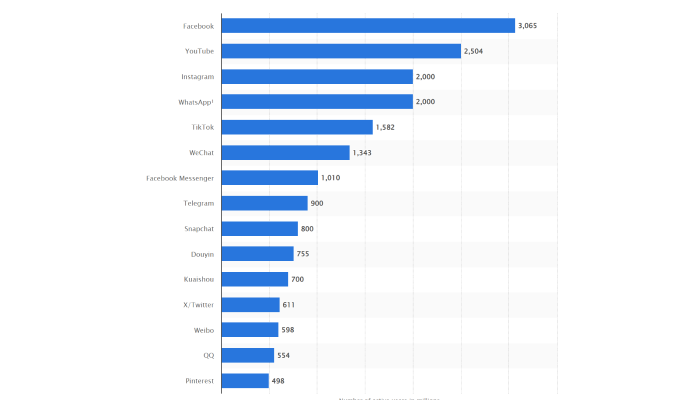
As of April 2024, YouTube boasts 2.504 billion monthly active users, making it the second most popular social platform globally. This massive user base positions the platform as a key player in social media.
Statista

The number of premium subscribers continues to increase

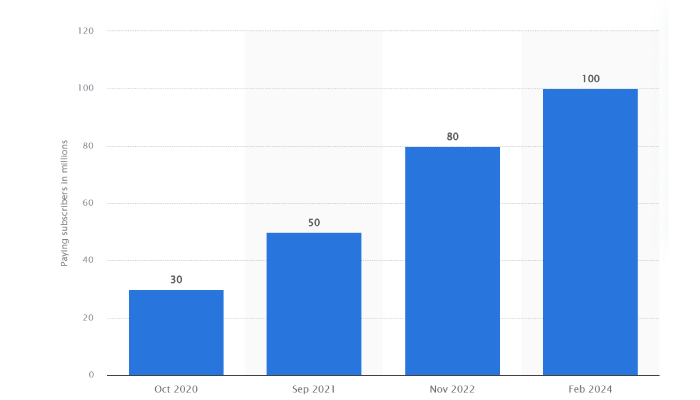
In February 2024, YouTube reached around 100 million paid subscribers across its Music and Premium services. This is twice its subscriber base from the 50 million recorded in September 2021. This highlights the increasing value users find in YouTube’s premium offerings. It also reflects its expanding influence beyond just free content. 
Statista

Monthly usage varies per region

As of July 2024, users around the world spent about 29 hours each month on the YouTube mobile app. Interestingly, users in Thailand topped the charts with an average of 49 hours and two minutes per month. Meanwhile those in Switzerland spent less than 10 hours. In the United States, the average user clocked in around 26.21 hours per month on the app.

India has the most number of YouTube users

As of July 2024, India held the top spot as the country with the largest YouTube audience, boasting about 476 million users. The United States came in second with approximately 238 million viewers. Brazil ranked third, with 147 million users tuning in to YouTube. Meanwhile, the United Kingdom had around 55.7 million internet users interacting with the platform during this period.

YouTube demographics stats

Who’s really behind all those views and likes? From age groups to gender and beyond, these demographic stats give us a clearer picture of who’s spending their time on the platform.

Men remain the top audience

As of July 2024, about 54.3% of YouTube users were male, while female users made up approximately 45.7% of the platform’s audience. This slight male majority may be attributed to the abundance of gaming, technology, and sports-related videos, which traditionally attract a larger male viewership.

The audience skews male regardless of age

In the same period, 12.1% of YouTube’s global audience consisted of men aged 25 to 34, while women in the same age group made up around 9.4%. Men aged 35 to 44 accounted for 9.8% of the platform’s total audience, with women in that age range representing 8.1%. These figures highlight the platform’s strong appeal among younger and middle-aged adults.

YouTube traffic and engagement stats

When it comes to YouTube, the numbers speak for themselves. From the devices we use to tune in to where in the world we’re watching, let’s dive into the details of who’s watching what, where, and how.

A slight dip in traffic

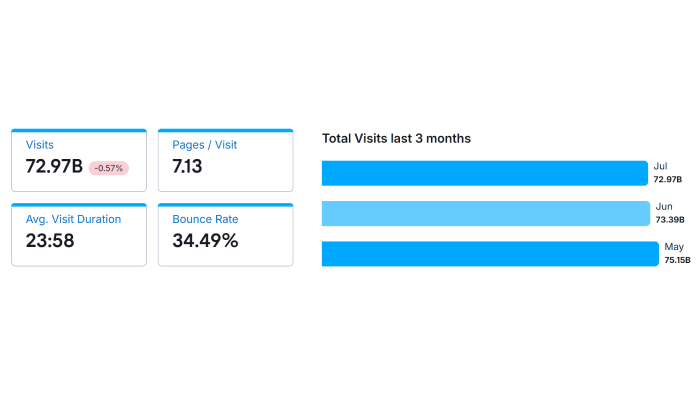
In July 2024, YouTube.com saw a total of 72.97 billion visits, marking a slight decrease of 0.57% compared to June. Users viewed an average of 7.13 pages per visit, with an average visit duration of 23 minutes and 58 seconds. The bounce rate for the month stood at 34.49%, indicating that a little over a third of users left the site after viewing only one page.
Semrush

Mobile drives more traffic

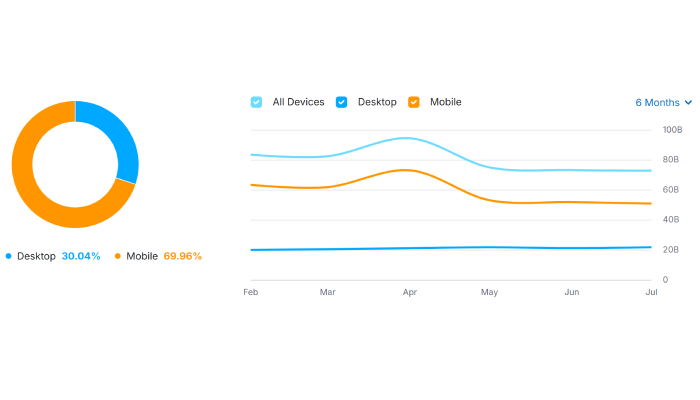
In the first half of 2024, desktops accounted for 30.04% of visits to YouTube.com, while the majority, 69.96%, came from mobile devices. This means many prefer consuming video content on the go.
Semrush

Traffic, according to device, varies by region

YouTube traffic showed significant variations across different countries and devices. In the United States, which contributed 15.56% of total visits, 31.66% of users accessed the platform via desktop, while 68.34% used mobile devices. 

South Korea, accounting for 10.08% of visits, had a strikingly low desktop usage at 9.59%, with 90.41% of users favoring mobile access. Meanwhile, in India, which made up 7.76% of total visits, 22.18% of users accessed YouTube via desktop, and 77.82% used mobile devices.

Engagement rates are highest for YouTube channels with 100K-1M followers

Channels with 100K-1M followers boast the highest engagement rate at 3.47%. This is likely due to their established credibility and focused content. Meanwhile, massive influencers with over 1 million followers still maintain a strong engagement rate of 3.40%. This means that even as audience size grows, these channels can sustain interaction.

On the other hand, smaller channels with 1K-5K followers struggle more, achieving only a 1.90% engagement rate. This might reflect the challenges of building a highly engaged audience at the earlier stages of channel growth.

YouTube advertising stats

Some industries are spending big bucks on YouTube ads, and it’s paying off. From cost-per-view (CPV) to retention rates, understanding which formats and devices work best can give your ads the edge they need.

YouTube ad revenue continues to increase

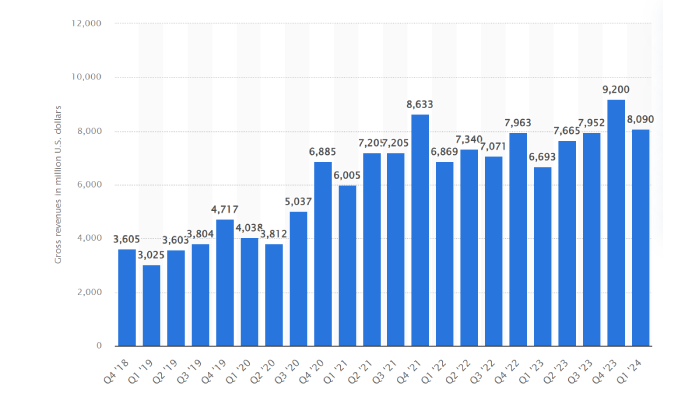
In the first quarter of 2024, YouTube generated 8.1 billion U.S. dollars in global advertising revenue. This is a 21% increase from the first quarter of 2023. This solidifies YouTube’s continued strength and appeal within the digital advertising industry.
Statista

YouTube leads, but multi-platform video strategies rise 

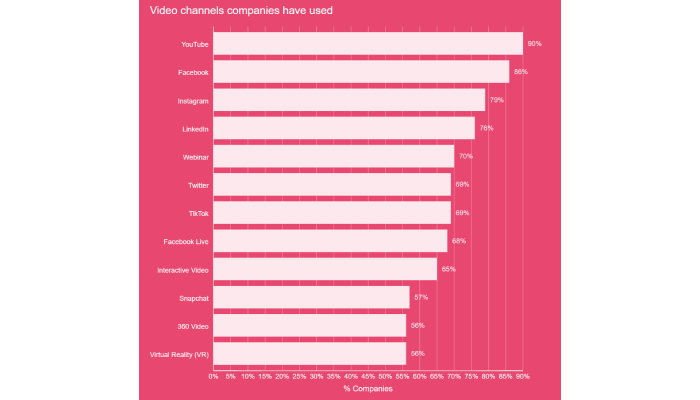
YouTube leads video marketing, trusted by 90% of marketers, followed by Facebook (86%), Instagram (79%), and LinkedIn (76%). This shows YouTube’s dominance, while Facebook, Instagram, and LinkedIn also play key roles in reaching different audiences.
wyzowl

YouTube is the most successful video marketing platform

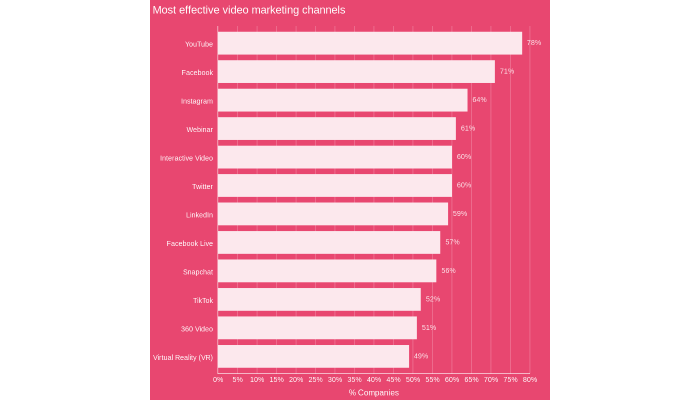
YouTube is the most effective video marketing platform, with 78% of marketers finding success there. Facebook video follows at 71%, then Instagram video (64%), webinars (61%), interactive video (60%), and Twitter/X video (60%). This likely reflects YouTube’s broad reach and video-centric nature, making it a top choice for impactful marketing.
wyzowl

A significant drop in CPV suggests improved efficiency

CPV decreased by 21.54% in the second quarter of 2024 compared to the second quarter of 2023. This may be due to better campaign tracking and higher consumer expenditures.

Seasonal shifts affect view rates

The view rate dropped 13% from the first quarter of 2024 to the second quarter, which may reflect a seasonal shift in viewer behaviors. Seasonal events such as holidays may lessen people’s screen time.

Mid-length video ads show strong performance

Mid-length video ads (16-30 minutes) had a 65.81% view rate and a 75% retention rate. As a result, marketers should expect higher costs for these ads. Furthermore, this length also has an ad length spend segmentation of 43%.

Single video ads offer balanced cost and retention

In the 2nd quarter of 2024, single video ads had a 53% view rate and an average budget of 1100+. This offers a better balance between ad cost and retention rates. This may be due to greater relevance, less viewer fatigue, or more focused messaging.

Mobile vs. tablet: Retention and engagement

Mobile devices had a 42% view rate, while tablets trailed slightly behind at 39%. Mobile held its own with 51% ad retention, but tablets took the lead in retention at 52%. Compelling video creatives are crucial to keep mobile users engaged—less screen real estate means more distractions.

Connected TVs dominate

Connected TVs (CTVs) were the MVPs this quarter, leading with a 66% ad retention rate and a 64% view rate. Clearly, people like watching ads when they’re on a big screen. Desktop wasn’t far behind, with a 57% ad retention and a 52% view rate.

Cost efficiency improves across mobile and CTV platforms

Mobile devices managed to reduce overall costs by 3% this quarter. But CTVs stole the spotlight as the most cost-efficient platform—costs were 5% lower than last quarter, with an impressive 20% improvement. This likely results from improved targeting precision and better ad delivery on CTV platforms

Ad view rates according to industry

Entertainment continues to dominate, with a view rate increase to 70% in Q2 2024, maintaining its top position. Business and finance also saw an uptick to 68%, while Food (CPG) significantly improved from 48% to 61%. The automotive and adult beverage industries also posted solid gains, rising to 63% and 58%, respectively.

Meanwhile, healthcare and insurance struggled slightly, dropping from 45% to 53%. Photography Publishing and art remained the lowest at 38%. 

Entertainment, business, and finance likely maintained high view rates due to sustained audience interest and effective content strategies

CPV changes per industry

Most industries benefited from reduced Cost Per View (CPV) during the second quarter of 2024. Photography Publishing & Art saw the most significant drop with a 29% reduction. The science and technology and Business and finance sectors also experienced decreased CPVs by 27% and 8%, respectively. Electronics experienced a 12% decline, attributed to hyper-personalized ad experiences.

However, not all industries saw a decrease. The automotive and Food (CPG) sectors actually saw CPV increases of 20% and 32%, respectively.

YouTube video formats stats

When it comes to YouTube, video format can make all the difference in capturing your audience’s attention. Certain formats consistently outperform others, resonating more with viewers and driving higher engagement. This data can help you tailor your content to maximize its impact and reach on the platform.

The leading YouTube video format in 2024 by video views

In the first quarter of 2024, YouTube Shorts trailed behind long-form videos in terms of average views. This is despite their growing popularity. On average, short-format videos on YouTube garnered about 650 views. Meanwhile their long-form counterparts performed better, pulling in 1,500 views on average. This suggests that while Shorts are engaging, traditional, longer videos continue to attract a larger audiences.

Engagement with YouTube Shorts and videos in 2024, based on account size

The engagement rate is another story, however. In the first quarter of 2024, huge YouTube accounts (with over 50,000 followers) saw a clear preference for short-format content. They boast an engagement rate of 6.2%. In stark contrast, their long-format videos only managed a 1.72% engagement rate. 

The trend was similar, though less pronounced, for Medium YouTube accounts (with 2,001 to 10,000 followers). These accounts reported nearly 3% engagement on their Short Videos. Meanwhile, their long videos only had a 0.15% engagement rate. 

These numbers suggest that viewers increasingly prefer quick, easily consumable videos. This is possibly due to shorter attention spans and the rise of platforms emphasizing short-form content. 

Most subscribed YouTube channels

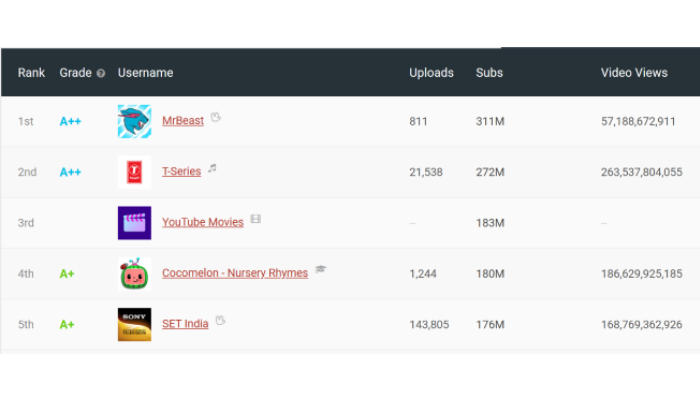
Knowing who the top YouTube channels are gives you a clear picture of who’s really making waves on the platform. This insight can guide your approach to collaborating with these channels and also clue you in on what kinds of content are trending. 
SocialBlade

1st place – MrBeast

  • Subscribers: 311 million
  • Total Views: 57,188,672,911

MrBeast continues to dominate YouTube, holding the top spot. This channel remains the leader with the highest engagement and shows no signs of slowing down.

2nd place – T-Series

  • Subscribers: 272 million
  • Total Views: 263,537,804,055

T-Series maintains its strong position as the second most popular YouTube channel. It remains stable in second place, showing neither a rise nor a fall in the rankings.

3rd place – YouTube Movies 

  • Subscribers: 272 million
  • Total Views: 263,537,804,055

YouTube Movies holds its ground in third place. Without specific view data, its consistent presence suggests a stable, if not growing, audience.

4th place – Cocomelon – Nursery Rhymes

  • Subscribers: 180 million
  • Total Views: 186,629,925,185

Cocomelon – Nursery Rhymes has dropped to fourth place. Despite its enormous popularity among younger audiences, it has experienced a slight decline in the rankings.

5th place – SET India

  • Subscribers: 176 million
  • Total Views: 168,769,362,926

SET India holds onto the fifth spot. Although its ranking has not changed, the channel continues to attract a vast number of viewers, solidifying its place in the top five.

Final thoughts

These numbers show YouTube’s rising impact in digital advertising and content creation. With retail and media industries leading the way, it’s clear that investing in YouTube can bring significant returns.

Whether you’re aiming to improve your ad campaigns or content strategy, these insights are crucial. Use them to sharpen your approach, increase engagement, and make a bigger impact on YouTube.

The post Key YouTube Stats You Need to Know This 2024 appeared first on jeffbullas.com.


* This article was originally published here

Start making $100+ per day this week with the best dfy system - Subscribe here!


Friday, August 23, 2024

11 Surprising Uses of ChatGPT—And One That Will Blow Your Mind

According to estimates, there are 1.4 billion people that use a chatbot everyday across various platforms in 2024. In September, 2022 no one was using ChatGPT. It didn’t exist. 

Why it matters

But the big question is. What are we using ChatGPT for? Is it just for entertainment or is it enhancing our productivity and creativity? As AI becomes more embedded in our daily activities, understanding its applications can help individuals and businesses leverage this technology to increase efficiency and innovation.

Diving into what others are using ChatGPT for reveals patterns that can help us be more creative and productive. It is also being used for entertainment and exploring human fantasies. But more about that later.

Between the lines

Various fund managers and venture capitalists are now telling us that AI is a waste of money. Because the “Magnificent 7” (that includes Google, Microsoft, Nvidia, Amazon, Meta  and more) have spent $600 billion and counting with very little short term return on investment. That is like saying in 1995 that the web browser and the Internet are a distraction and a waste of time and money. It also reeks of short term thinking and impatience.

Charlie Munger (the right hand man of Warren Buffet at Berkshire Hathaway) was quoted as saying “The patient make money from the impatient.” AI and the dominant chatbot ChatGPT have only started. This is a generational change of technology. In fact it may be the biggest change that humanity has ever seen. Patience and playing the long game is required.

The big picture

The rapid advancement of AI technologies like the chatbot ChatGPT is reshaping industries including the creative industries. This includes creating blog posts, articles and images and even video. The creatives of Hollywood are becoming twitchy. They are asking questions such as “Will AI steal my job?” The right question to ask is “Will human beings using AI steal my job?” 

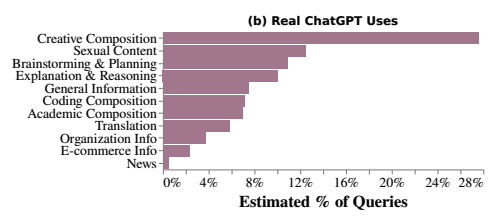
According to an MIT Technology review article based on research by Shayne Longpre, Mahari and others at arxiv.org that analyzed one million ChatGPT logs, there are many ways that we are using ChatGPT. The chart below reveals the top 11 ways we are using chatbots.

The fact that creative composition sits at #1 is not surprising but the use of Chatbots for sexual content being ranked at #2 was a revelation. ChatGPT and other general primary chatbots are very much controlled and censored.  But open source AI allows anyone to create custom chatbots for specific uses. 

ChatGPT is not the only chat bot game in town and people are creating chatbots that target niches. Entrepreneurs are always on the lookout for what people want and desire and then create new products and services that make them money. 

Going deeper 

AI allows us to use a digital assistant (chatbots) to do the  heavy lifting. Find information, organizing it, unearthing insights and much more. As humans we are always looking to find easier and faster ways to do things. Laziness meets efficiency. Doing more with less. 

So in looking at the many ways we are using AI, keep in mind that ChatGPT allows us to be more productive, creative, even distracted and entertained. That’s why I found it fascinating to see where the attention and use of chatbots is emerging. 

The 11 top ways we are using ChatGPT

Let’s take a deeper dive into what the 11 top ways people are using Chatbots including ChatGPT. 

Here are the top 11 uses of chatGPT in order of usage and with ChatGPT used for helping us be more creative as the most popular way we as humans interact with the AI machine is maybe not expected.

  1. Creative composition – This includes text, images and video. Give ChatGPT a series of prompts for creating a new article or for an image and it will surprise you. And sometimes delight you. This sits at 30% as the top use of chatBots and ChatGPT.
  1. Sexual ContentThe “Not Safe for Work” (NSFW is the acronym)  is a new term for AI systems designed to facilitate adult themed interactions and help people explore their fantasies.

    Here is an interesting list of “The Best 42 Free NSFW AI chatbots in 2024”. The sex bot seems to have made its impact and sexual role playing using Chatbots seems to have delighted many lonely and unfulfilled people and it seems it is a bit addictive.

    But maybe this is because the porn sites have adopted new technology faster than most industries which is not generally discussed but is a reality. This surprising use of Chatbots is currently 13% of chatbot use. 
  1. Brainstorming and planning – Nothing like asking ChatGPT to provide ideas that expand our fixed and frozen imaginations. I often use it for helping me come up with new ideas or expanding my thinking. It is like having an idea generator at your beck and call. 
  1. Explanation and reasoning – Sometimes you find a phrase that is confusing. The words are obscure and the reasoning is cloudy. Often academics who wrote a scientific paper forgot to use plain language and used acronyms we have never seen or heard.  ChatGPT can distill that in simple language. In seconds ChatGPT can make sense of the phrase.
  1. General information – Asking the oracle (AI) for some general information that bypasses the tangled response of a search engine is time saving.Using Google search is great and has evolved way beyond its basic foundations.

    But it only provides simple insights that include things like snippets that link to websites that answer questions that are commonly asked on its search engine answer page “People also ask.” ChatGPT prompts can take your question or prompt and curate and distill all that information in an easy to understand response.
  1. Coding composition – I have never been able to write code. It appears that ChatGPT can now make many of us coders.
  1. Academic composition – Academia is a convoluted and complex ecosystem which has been built over centuries. The rules are many and the process is often confusing when it comes to writing a scientific paper. Asking AI to make  sense of this complexity and the “big words” to help you sound intelligent could maybe get you a better grade when writing for the professor. 
  1. Translation – Speaking another language or translating it in the past needed skilled translators. Slow and expensive. ChatGPT turns this into one prompt. “Translate this text into French”. The biblical story of the Tower of Babel and its confusion for communicating globally has been fixed by AI. The “gods” will not be happy.
  1. Organization info – Using AI to create processes for your business is often done with a few prompts after feeding it some information in a text format. There are many other ways ChatGPT can be used for creating, summarizing, organizing any business information.  
  1. E-commerce – Chatbots are increasingly being used in eCommerce to enhance customer experience, assist customer service, streamline operations, and personalized shopping assistance.  It ranks at #10 with a 2% usage rate as a share of the top 11 chatbot uses..
  1. News – ChatGPT and large language models are usually lagging in up to date news but it seems that a few people are expecting that it is faster than social media. I was interviewed 10 years ago and surprised to learn that most young people got their news from social media rather than directly from the source. It seems that this trend continues with AI and ChatGPT. 

The major insight for me is that AI is not only helping us do the heavy lifting on removing the mundane but it is also becoming our creative assistant. 

A wrap

The use of new technologies continues to surprise me and any complex technology that is given a simple and easy to use user interface has changed the world and our lives. 

It started with making the PC easy to use with Microsoft Windows, It then showed its friendly face on how to use the Internet with the Web Browser (Netscape, Internet Explorer and its successors), The Google search engine, The smartphone (Apple’s easy to use touch screen) and its app store. 

And now we have the complexity of AI being given a simple prompt box user interface to discover humanities intelligence and curate it with one click. 

As we have used these new technologies, the creative human spirit and ingenuity continues to surprise us. What is the future of AI and its sibling chatbots –  including the current leading app – ChatGPT that is not even 2 years old? 

The wild west of AI and chatbots will continue. Many offspring and multiple twists and turns will show up. I watch with curiosity and optimism.  

The post 11 Surprising Uses of ChatGPT—And One That Will Blow Your Mind appeared first on jeffbullas.com.


* This article was originally published here
Start making $100+ per day this week with the best dfy system - Subscribe here!


Thursday, August 22, 2024

Buy Spotify Plays: 5 Best Sites (Real & Instant)

It can be confusing choosing the right site to buy Spotify plays from

It can take you months or years of hard work to record quality music and promote it on Spotify… and you might feel like giving up completely…

How can you you fix this?

You can buy Spotify plays.

We tested over 23 websites that sell Spotify plays and made a list of the top 5 sites in this blog post.

Here’s a list of the 5 best sites to buy Spotify plays

We recommend using one of the providers who we have carefully tested for quality and reliability:

1. UseViral

Buy Spotify Plays from UseViral.com

Score: 9.5/10

You can buy real Spotify plays from UseViral.com.

This website is selling genuine plays from real human users who are active on Spotify, so they will listen to your songs and share them with other listeners. 

UseViral has been featured in many magazines like ‘Chicoer‘, ‘Forbes’ and ‘Business Review’ as the best site to buy Spotify followers & plays.

✅ PROS:

  • Real Spotify plays
  • Active users
  • Real and high quality monthly listeners
  • 100% Money-Back Guarantee

❌ CONS:

  • They don’t accept Bitcoin payments

For more info, visit UseViral.com.

2. SidesMedia

Score: 9.3/10

The next website on my list is SidesMedia.com.

This website is selling real Spotify monthly listeners and plays that come from real humans with active Spotify accounts, so they will listen to your tracks and share your songs with other users active on the platform. 

They’re featured as the best place to buy Spotify plays by magazines like Business Insider, Startup Info, and Outlook India.

✅ PROS:

  • Real Plays from real people
  • Active Spotify users
  • 100% Money-Back Guarantee

❌ CONS:

  • They don’t accept Bitcoin payments

For more info, visit SidesMedia.com.

3. Growthoid

Score: 7.9/10

Growthoid is a Spotify promotion service. They are the kind of company that can tap into a vast network of influencers and connections in their industry to help you advance your Spotify’s reputation.

The best part is, they make the entire setup process really simple and straightforward. All you have to do is go to their website, and decide how many Spotify plays you want to purchase right now.

They depend on their network as a promotion service to ensure that you get high-quality plays, which is going to protect your Spotify’s reputation.

The reason that we like Growthoid is that they guarantee 100% real Spotify plays. This means that they aren’t in the business of using bots with their clients, which could pose a risk to your reputation.

Instead, they take the time to find authentic engagement for your music, so that you can grow it in ways that are credible and build your social proof.

Another thing that you will like about Growthoid is that they are relatively affordable, especially when you compare them to other companies in the industry.

On this site, you can also Buy Spotify Monthly Listeners.

Check out Growthoid if you wish to obtain more information about their services.

✅ PROS:

  • Professional social network promotion
  • This promotion is compatible with various platforms
  • Good customer support

❌ CONS:

  • Limited payment options

4. Spotify Ads

Score: 7.5/10

The second way to buy Spotify plays is through Spotify ads. Just like any other popular social network out there like YouTube or Instagram, Spotify has a way of helping its users promote their music to their target audience through paid ads.

So, this means that you’re not technically buying Spotify plays, you’re amassing them through Spotify’s ad system. The more you pay for Spotify to promote your music, the more people are likely to come and check out your Spotify playlists and sign up to become regular listeners.

This approach is more organic than buying Spotify plays outright, and it can take a lot longer to grow your Spotify monthly listeners and plays. However, the downside to this approach is that it is relatively expensive.

Only people who have a solid budget for social media marketing on their account are going to be able to afford something like this because it’s a high price to pay for relatively little return.

However, what you do get with this approach is safety. This method is definitely not going to put your account at risk of being suspended or banned by Spotify, because you are working directly with them to buy Spotify streams.

✅ PROS:

  • Establish your presence in the music world.
  • You can buy Spotify plays cheap
  • Cost efficient services

❌ CONS:

  • No live chat support

5. Other Ad Networks

Score: 6.9/10

You might not know this, but you can actually use other ad networks out there to get traffic to your Spotify profile. These include Facebook of course, but there are lesser-known options as well including Outbrain.

The thing about other ad networks, though, is that there is a lot less user intent. This means that you have to go out to other networks and websites and encourage those people to make the leap to your Spotify profile.

You can think of this approach as cold calling – before you call them, they weren’t even thinking about being interested in your Spotify tracks.

This is a harder method because you aren’t engaging with people who are already on the platform. This also means that your cost-per-view can end up being a lot higher, which means that it’s going to end up costing a lot of money to grow your plays on your Spotify tracks.

The upside to this approach is that it does end up exposing you to a much wider network of users, which is going to be great for track awareness and promoting your name as an artist in general.

If you are trying to find other people online and convert them into Spotify listeners, then this is a good option. Just remember that it’s going to cost you a lot of money to get your Spotify profile to a good place, where you are satisfied with your play count.

✅ PROS:

  • This website is a recommended option to promote your account
  • It is also possible to purchase Spotify listeners
  • You can buy Spotify plays safely and securely

❌ CONS:

  • There is no choice for a slower delivery

Bonus: Influencer Marketing

Another way to get more attention without having to buy Spotify plays is to make the most of influencer marketing.

There’s a good chance that you probably already know a fair bit about influencer marketing, as it’s currently one of the most popular methods to be seen by the right people in your industry on Spotify and other social networks.

The thing about influencer marketing is that it involves many more factors than direct advertising, so we’re not saying that it’s necessarily simpler or more straightforward.

You take a risk with each campaign, as you have no idea how it is going to be received, and whether you will see a return on your investment. However, it is a risk that can end up paying off in a big way over an extended period of time.

Can you buy Spotify Monthly Listeners?

Yes, all these providers that made our top five, offer real-time monthly listeners, so if you are looking for a regular promotion it would be a smart choice to buy monthly listeners for your Spotify from these top sites:

5 Best sites to buy Spotify monthly listeners:

After our review and careful testing we identified these to be the top sites for on-going monthly listeners:

  1. UseViral.com
  2. SidesMedia.com
  3. Growthoid.com
  4. TweSocial.com
  5. TokUpgrade.com

Frequently Asked Questions about buying Spotify plays for your Spotify account

The following are the most frequently asked questions.

How to buy Spotify plays?

Increasing the number of plays could potentially strengthen an artist’s reputation through social proof, which may lead to an increase in streaming of their songs by listeners.

How to buy Spotify plays without getting into trouble?

To ensure the safety of your account, it is recommended to buy Spotify plays, streams and monthly listeners from reputable and credible sources, such as social media marketing websites.

Where to buy Spotify plays?

Websites like UseViral.com and SidesMedia.com offer the option to purchase Spotify plays, followers, and monthly listeners for your playlist or podcast on the platform. This can be an effective method for promoting your music.

Where can I purchase Spotify plays in large quantities?

Bulk Spotify plays can be purchased on websites such as UseViral and SidesMedia. These sites offer discounts on bulk purchases, which can be useful for promoting your music in the industry.

How to buy plays on Spotify and Apple music?

Websites such as SidesMedia.com and Useviral.com offer the option to buy plays for your tracks. This can potentially increase your audience and attract more dedicated fans. Tracks with high play counts have a greater chance of being featured in official Spotify playlists, which can lead to more exposure for your music.

Can I buy Spotify plays cheap?

There are companies that offer affordable Spotify growth services, but it’s important to research and choose a reputable provider to buy streams and followers as not all services are equal.

Should you buy Spotify plays?

Just like buying YouTube or Instagram followers, when you buy Spotify plays, you are using a popular marketing strategy used by millions of people on various social media platforms. It’s up to you if you wish to use this method or not.

How do you buy Spotify plays & monthly listeners?

There are three main ways to buy Spotify plays. Each comes with its advantages and disadvantages. You can buy them from websites, freelancer marketplaces like Fiverr, or buy real ads to slowly attract plays and listeners.

Purchasing plays is a good strategy for your Spotify artist profile and many artists use these affordable services to get more streams and get all the plays they wanted to make the Spotify algorithm happy and to get their music discovered in the music industry.

Buying Spotify services and buying Spotify plays safe for your artist profile to boost your music career on the Spotify app and promote your Spotify songs on multiple Spotify playlists and many artists use these cheap services to buy plays and to promote their latest Spotify song to buy real Spotify streams.

Purchasing plays is safe and secure and all websites where you can buy plays use an SSL encrypted payment gateway for all their music promotion help.

That’s why many artists get more plays and more streams on their artist profile by using these Spotify promotion services for their artist profile which will help get them more real Spotify streams on their artist profile and speed up their music career, because they care about their music career and becoming famous after using these Spotify services on the Spotify platform.

Buying plays is the best way to get more plays after you create playlists and you’ll also get more Spotify followers if you buy Spotify followers after buying plays, before buying plays, or at the same time as buying plays, because buying plays is important.

If you care about your Spotify promotion, these are the best Spotify services, and this top Spotify services can help you with your Spotify promotion in the music industry.

How to get more Spotify plays and monthly listeners without buying them

The good news is that with Spotify, you also have the option of getting more plays on your music without buying them.

You definitely don’t need to go down the buying route, so let’s take a look at a few ways to grow your Spotify plays without spending too much of your marketing budget.

Create a Spotify for Artists Account

When you create a Spotify for Artists account, you can instantly be verified, which is a great way to add to your account’s credibility.

You will also have exclusive access to all kinds of different features, from data analysis of your tracks to notifications when your music has been added to someone else’s playlist.

This is kind of like the business version of an Instagram account, and it’s going to go a long way in helping you get seen by more of the right people. It is also going to show them that you take your Spotify growth seriously as an artist, and want to do really well with it.

Make sure that you use it to keep track of playlist data, and try to keep in front of trends so that you can capitalize on them. The best part is that this feature is completely free to use, and helps you find out when someone is listening to your music, as well as which tracks are doing really well.

Create Your Own Playlists

Instead of waiting for people to build hype around your music, why not create your own playlists? This is a great way to bring your best tracks together in one place. The best part is that you can pin them to your homepage, which is a great way to show off your current content to visitors of your Spotify profile and bring your community together.

This is where the promotion of other people’s music comes in as well. You can create playlists for your audience to listen to that include some of your other favorite artists.

You never know – they might return the favor and choose to feature some of your tracks on their playlists as well. This is a great way to work with others to promote your tracks so that you can be seen by even more people in your industry.

Cross-Promote Your Content

If you have other social networks that you are trying to grow at the same time as Spotify, then capitalize on them.

Make sure that when you come out with a brand new track on Spotify, cross-promote it to the rest of your social networks.

If you have managed to build up a bit of a following on Instagram and Twitter, then there is a great opportunity to transcend audiences and consolidate them for even more exposure on your tracks.

Promoting your music to your various social networks is a great way to stay dynamic in your community, and drive more traffic to your Spotify account.

While it might be a bit time-consuming, try to consolidate your online activity with all of your networks, so that they can grow simultaneously.

They offer all kinds of services for getting more listeners, plays or even followers.

Best of all getting started is really easy, simply sign up choose your package and watch it unfold. 

Final thoughts: Should you buy Spotify streams to promote yourself in the music industry?

So, there you have it. Now that you have had a chance to see the three main ways of buying Spotify plays, which one do you think you’re going to try first?

Of course, there are many different factors that determine your decision. It depends on your budget, which is why I recommend testing each one out to see which is best for your brand. If your budget doesn’t allow for experimentation, begin with the first approach.

When you buy Spotify plays, you are using a powerful method to get your music seen by the right audience and stand out from the crowd. Learn how to get many Spotify plays on your tracks, and watch your music do a lot better this year.

About The Author: Antonio Lane is a tech entrepreneur who is passionate about marketing. He has helped hundreds of companies succeed online and on social networks.

The post Buy Spotify Plays: 5 Best Sites (Real & Instant) appeared first on jeffbullas.com.


* This article was originally published here

Start making $100+ per day this week with the best dfy system - Subscribe here!


Friday, August 16, 2024

Are Bing Ads the Digital Advertising Underdog to Watch In 2024?

When it comes to digital advertising, Bing Ads might not be the first platform that comes to mind. 

Bing Ads have long been underestimated, often overshadowed by its more popular competitor, Google Ads. Yet, beneath its seemingly quiet exterior lies a powerhouse that many advertisers are overlooking. 

First, some data

> In 2015, Bing held a global search engine market share of 3.99%.

> This figure had surged to 10.51%, marking a significant milestone as it broke the 10% barrier at the start of 2024.

> While Google still commands an impressive 81.95% of the market, this is a decrease from its nearly 90% share just five years ago, highlighting Bing’s noteworthy progress in a highly competitive landscape.

It’s a common misconception that Google Ads are the only player in the game, but that couldn’t be further from the truth. Relying exclusively on one platform is like fishing in only one part of the ocean—there’s a whole other sea of opportunities. That’s where Bing Ads come in. This often-overlooked platform offers unique advantages that could give your advertising strategy the edge it needs.

In this article, we’re going to dive into why Bing Ads deserves your attention, uncover its hidden benefits, and show you how to maximize its potential for your advertising success. Get ready to rethink your approach and discover what Bing Ads can do for you!

What are Bing Ads?

Bing Ads, now known as Microsoft Advertising, is a pay-per-click (PPC) advertising platform that allows businesses to display ads on the Bing search engine. Your ads are also displayed in partner networks, including Yahoo and AOL. In the broader PPC ecosystem, Bing Ads plays a crucial role, offering advertisers an alternative to Google Ads while still delivering targeted, effective ad campaigns.

To set the stage, let’s compare Bing Ads with Google Ads. While Google Ads is undoubtedly the giant in the PPC world, commanding a significant share of the market, Bing Ads shouldn’t be dismissed. Bing Ads operates similarly to Google Ads—both platforms allow you to create campaigns, bid on keywords, and pay only when someone clicks on your ad. However, Bing Ads operates in a slightly different space, offering a distinct set of advantages that often go unnoticed by advertisers.

Why advertise on Bing?

So, why should you consider advertising on Bing? 

For starters, Bing Ads has significantly lower competition than Google Ads. This lower competition translates to a lower cost per click (CPC), meaning you can stretch your advertising budget further while still reaching your target audience. 

Another key benefit of Bing Ads is the ability to reach a unique audience that you might not find on Google. Bing’s user base tends to skew slightly older (not that we’re judging), with higher income levels and a higher likelihood of using desktop computers. Additionally, because Bing Ads is part of the Microsoft Advertising Network, your ads can also appear on other platforms like LinkedIn ads, adding even more value.

Setting up your Bing Ads account

Setting up your Bing Ads account is the first crucial step to unlocking a powerful platform for reaching a unique and engaged audience.

Sign in to your Microsoft account

    To get started with Microsoft Advertising, sign in using any existing email address (like Outlook, Gmail, or Yahoo) on the Microsoft Advertising sign-up page. If you already use this email for Microsoft services (like Skype or Xbox LIVE), just sign in. 

    Otherwise, click “Create one!” to set up a new Microsoft account. Follow the prompts to create a password, enter your name, and verify your email with a code. Complete the security check and, if needed, set up the Microsoft Authenticator app for added security. You can choose to stay signed in for easier access in the future.

    Create a Microsoft Advertising account

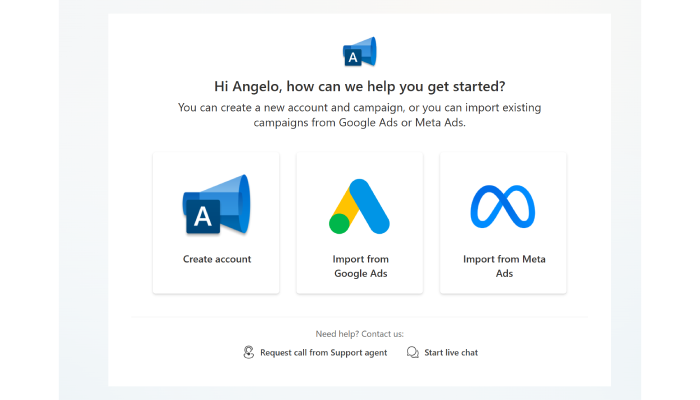
      Once you’re signed in, you can set up your Microsoft Advertising account. You’ll see options to “Create account,” “Import from Google Ads,” or “Import from Meta Ads.” If you do have accounts with these platforms, you can import your campaigns directly.

      If you don’t have an account with Google Ads or Meta Ads, select “Create account.”

      Select your country and language

        Choose the country where your business is located, the language in which you want to advertise, and click “Next.”

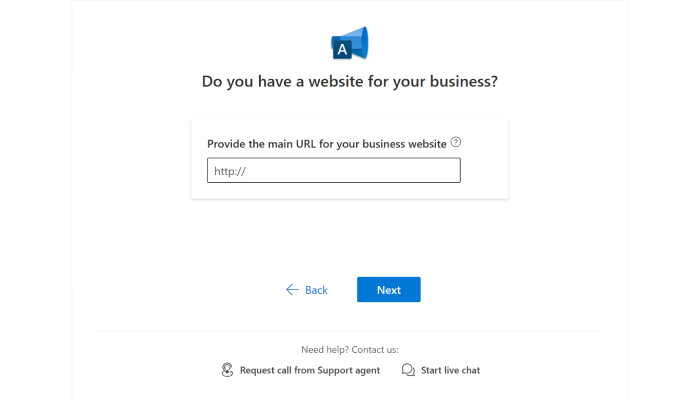
        Provide your business website

          If you have a website, select “I have a website” and enter the URL. 

          Create an account and/or campaign

            Choose between “Create account and campaign” or “Create account only.” If you’re just setting up the account for now, skip to step 9 below.

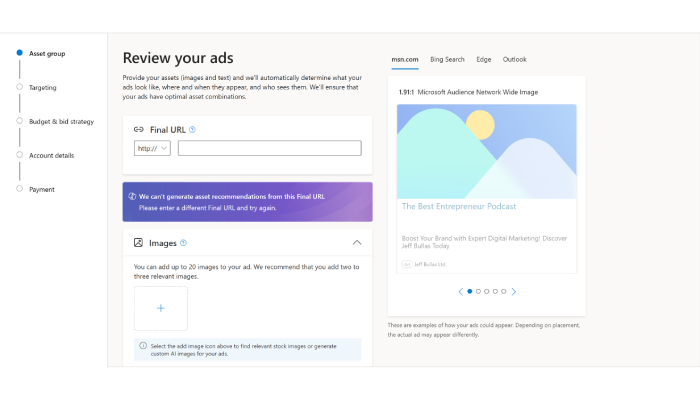
            Review your ads

              If you enter a website URL, Microsoft will pull information from your site to help create your ads. Add or edit details like your Final URL, Images, Short and Long headlines, Descriptions, and Business name. Click “Next.”

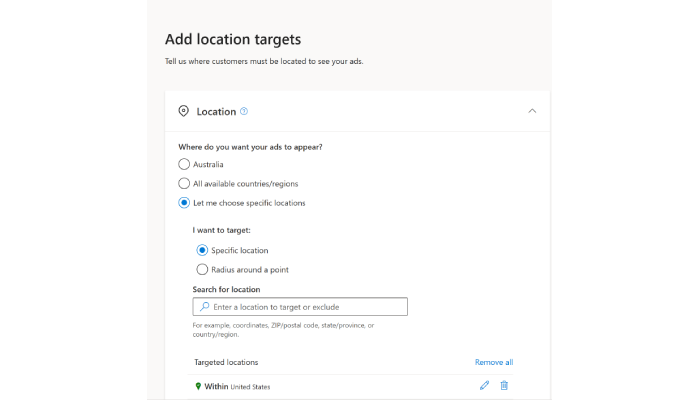
              Select your audience

                Choose where you want your ads to appear and set your location targets. Click “Next.”

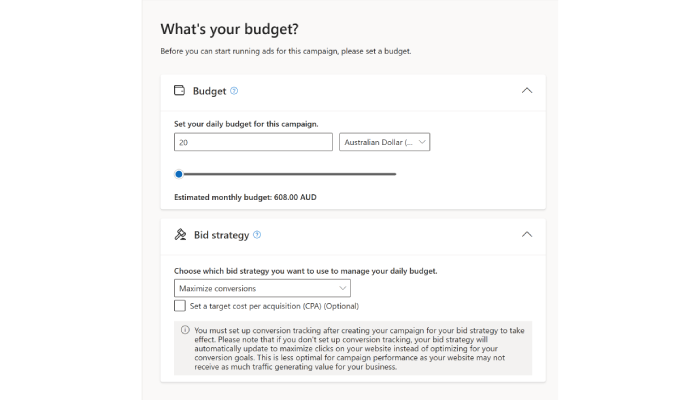
                Set your budget

                  Decide on your Daily budget and choose your Bid strategy.

                  Note: To optimize your campaign, set up conversion tracking after creating it. Without it, your bid strategy will default to maximizing clicks, which may not be ideal for driving conversions.

                  Depending on your strategy, you might want to set a Target return on ad spend (ROAS) or Target cost per acquisition (CPA). Click Next.

                  Finalize your account

                    Provide your legal business name, phone number, business location, and preferred time zone. Click “Next.” 

                    Select your billing country/region, choose your payment setting, and enter your payment method. If you have a promotional offer, enter it now (optional). 

                    Review the Microsoft Advertising Terms and Conditions, agree to them, and click “Submit and go live.” You’re all set! Your Microsoft Advertising account is now live and ready to start driving traffic to your business.

                    Navigating the interface

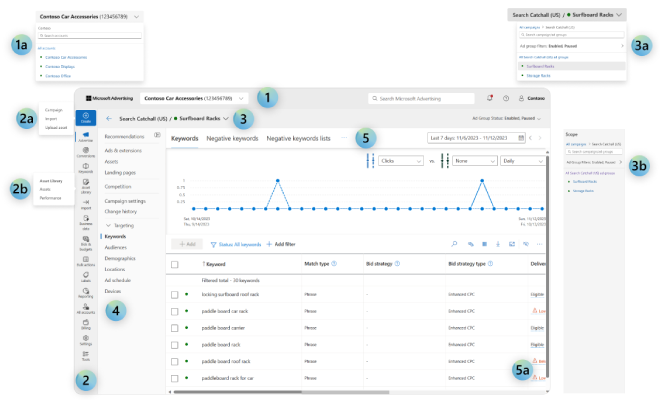
                    When you first dive into Bing Ads, you’ll find a dashboard that’s pretty intuitive and easy to navigate, even if you’re new to the platform. The dashboard is designed to give you a snapshot of your campaigns’ performance right off the bat. You can quickly see metrics like impressions, clicks, and conversions, which is super handy when you’re trying to assess how well your ads are doing.

                    Microsoft

                    One cool feature is the customizable columns—you can drag and drop to rearrange them or add the ones that matter most to you. This lets you tailor the dashboard to fit your specific needs, which is a nice touch. The left navigation bar allows easy access to importing ads, tools, and reports. It also makes it easy to switch between accounts or campaigns without getting lost.

                    Another thing to note is the Recommendations section. Bing Ads will suggest ways to improve your campaigns, like adjusting bids or targeting options. It’s like having a mini-coach built right into the platform, guiding you toward better performance.

                    Crafting effective Bing Ads campaigns

                    Crafting effective Bing Ads campaigns is key to maximizing your ad performance and reaching your target audience with precision.

                    Understanding targeting options

                    Creating a successful Bing Ads campaign starts with understanding the platform’s robust targeting options. 

                    Demographic targeting

                    Bing Ads allows you to adjust your bids based on age, gender, and even household income. This means you can focus your budget on the demographics that are most likely to convert, ensuring your ads are seen by those who matter most to your business.

                    Device targeting

                    With Bing Ads, you have the flexibility to target users based on the devices they use—desktop, tablet, or mobile. This feature is handy if you know your audience prefers specific devices. For example, if you’re targeting professionals who are more likely to browse on desktops during work hours, you can adjust your bids accordingly.

                    Location targeting

                    Bing Ads lets you target specific geographic areas, from entire countries down to individual cities or even zip codes. This level of detail is perfect for local businesses or campaigns that need to reach a specific region. By fine-tuning your location settings, you can ensure your ads are shown only to users in the areas where you do business.

                    Bing Ads also allows you to layer multiple targeting options, such as combining device and location targeting, to create highly customized campaigns that deliver results. 

                    Ad formats and extensions

                    Once your targeting is nailed down, the next step is choosing the right ad formats to capture your audience’s attention. Bing Ads offers various formats, each designed to meet different advertising goals and engage users in unique ways.

                    Text ads 

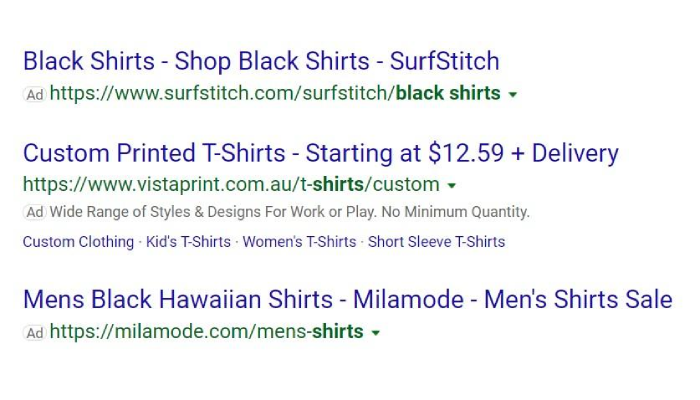
                    These are the most common formats and appear directly in Bing’s search results. They are straightforward ads with a headline, description, and a link to your landing page. Text ads are great for driving traffic to your website and are easy to set up and manage.

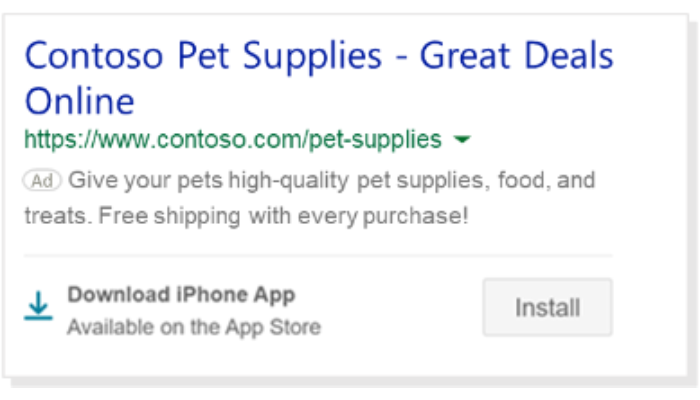
                    App install ads

                    App Install Ads work similarly to text ads but with a key difference: they offer a direct link to your app with a download button, taking customers straight to the app store. This is an excellent option if your goal is to boost app downloads rather than just drive traffic to your website.

                    Microsoft

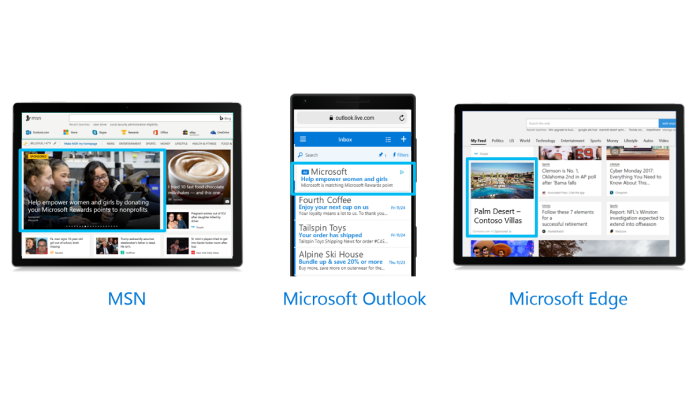
                    Audience ads

                    Audience Ads target your ideal customers using consumer intent signals and Microsoft AI. They can appear as native ads, display ads, or video ads across platforms like MSN, Microsoft Start, Microsoft Edge, Outlook.com, and more.

                    Microsoft

                    There are two ways to create these ads: either provide a feed, and the ads will be created for you, or supply your own assets (images, text, and video).

                    Multimedia ads

                    Multimedia Ads are eye-catching, with large visuals designed to draw attention to your brand and products, driving more traffic and sales. These ads appear in mainline and sidebar positions without replacing your text ads.

                    Product ads

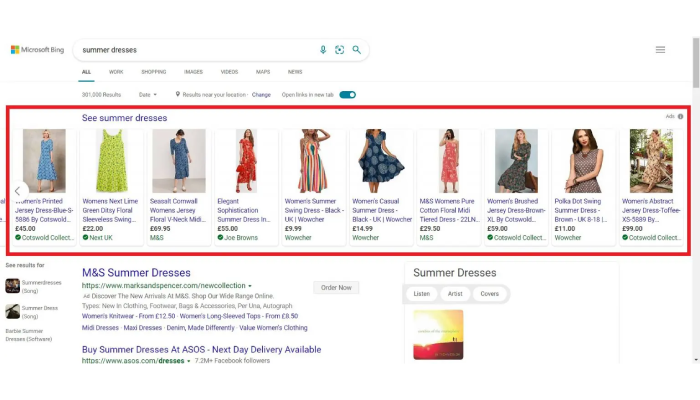
                    Product Ads showcase images from your product catalogs, along with promotional text, pricing, and seller details. These are pulled from your Microsoft Merchant Center account.

                    Responsive search ads

                    Responsive Search Ads simplify ad creation by allowing you to provide up to 15 headlines and 4 descriptions. Microsoft Advertising will then mix and match these elements to find the most effective combinations. This helps you adapt your ads to better align with what potential customers are searching for.

                    Vertical ads

                    Vertical Ads use dynamic data feeds and Microsoft AI to generate personalized ads that require no keywords. These ads deliver more volume, better click-through rates (CTR), and lower cost per click (CPC).

                    Dynamic search ads

                    These ads automatically generate headlines and landing pages based on your website’s content, making them a great choice for large sites with extensive product catalogs. Dynamic Search Ads save you time while ensuring that your ads stay relevant and up-to-date.

                    Mega Digital

                    Ad extensions 

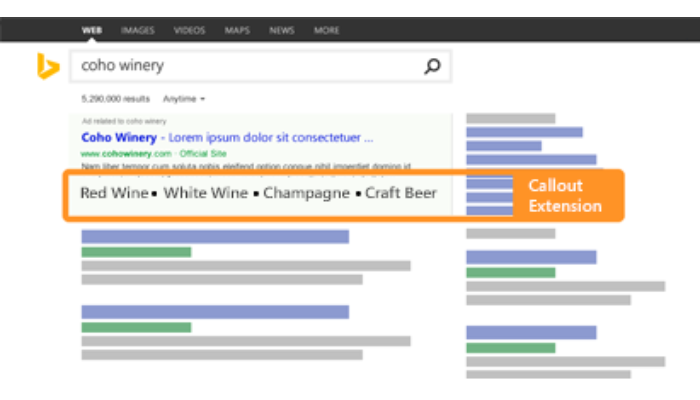
                    These are a must for enhancing your campaign’s visibility and engagement. Bing Ads offers a variety of extensions, such as site link extensions, call extensions, and location extensions. These allow you to include additional information directly in your ad, like extra links to specific pages on your site, your business’s phone number, or your physical address.

                    Microsoft

                    Using ad extensions can also improve your ad’s position on the search results page, as Bing tends to favor ads that offer a richer experience for users. So, not only do extensions help you stand out, but they also increase your chances of capturing those valuable clicks.

                    Optimizing your Bing Ads for better performance

                    Optimizing your Bing Ads for better performance ensures that your campaigns deliver the highest return on investment by refining targeting, bidding, and ad strategies.

                    Keyword strategy

                    When it comes to successfully advertising on Bing, your keyword strategy is paramount. Choosing the right keywords can make all the difference in ensuring your ads on Bing reach the most relevant audience. But how do you go about selecting the best keywords for your campaign?

                    Before diving into keyword research, take a moment to really understand who you’re targeting. What are they searching for? What problems are they trying to solve? This is the foundation of your keyword strategy. The more you know your audience, the better you can anticipate the terms they’re likely to use.

                    Microsoft Ads comes equipped with a pretty handy tool called the Keyword Planner. Think of it as your personal guide to uncovering the most relevant keywords for your campaigns. Plug in some seed keywords, and it’ll suggest a bunch of related terms along with search volume and competition data. This helps you pick keywords that are both popular and within reach.

                    To further refine your targeting, take advantage of Bing’s match types:

                    • Broad match – captures a wide audience by showing your ads for searches that include your keyword in any order, along with related terms.
                    • Phrase match – shows your ads only when the search query contains your keyword in the exact order you’ve specified. 
                    • Exact match – narrows it down to only the exact term or close variations, ensuring you’re reaching the most precise audience.

                    In addition to match types, don’t forget to use negative keywords. These are terms you specifically exclude from triggering your ads, helping you avoid irrelevant clicks that can drain your budget. 

                    For example, if you’re advertising a premium product, you might use “cheap” or “free” as negative keywords to prevent your ads from showing up in these searches.

                    Bidding strategies

                    Once you’ve nailed down your keywords, the next step is to consider your bidding strategy. Regardless of the bidding strategy you choose, it’s important to regularly review your campaign data and make adjustments as needed. 

                    Bing Ads offers both manual and automated bidding options, each with its own advantages.

                    Manual bidding

                    You have full control over how much you’re willing to pay for each click. This option is great if you want to closely manage your budget and adjust bids based on specific performance insights. For example, if you notice that certain keywor placements are driclosely ving higher conversions, you can increase your bids to capitalize on those opportunities.

                    Automated bidding 

                    This method removes some of the guesswork by using Bing’s algorithms to automatically adjust your bids to achieve goals like maximizing clicks or conversions. This can be especially useful for advertisers who want to save time and let the platform optimize bids based on performance data.

                    Ad copy best practices

                    Crafting compelling ad copy is another crucial aspect of optimizing your Bing Ads campaigns. Your ad copy should grab attention and drive your audience to take action.

                    Start by highlighting your product or service’s unique benefits. What sets you apart from the competition? Whether it’s a special discount, a standout feature, or a limited-time offer, make sure these points are front and center in your ad copy.

                    Next, incorporate a strong call to action (CTA). Phrases like “Shop Now,” “Get Started Today,” or “Learn More” can prompt users to click on your ad and move further down the sales funnel. Remember, clarity is key—your audience should instantly understand what they’ll get by clicking on your ad.

                    A/B testing

                    Experiment with variations in headlines, descriptions, and CTAs to see which combinations resonate most with your audience. Over time, A/B testing can reveal valuable insights into what drives clicks and conversions, allowing you to refine your approach and boost overall performance.

                    Tracking and analyzing your Bing Ads

                    Tracking and analyzing your Bing Ads is essential for measuring success, making data-driven decisions, and continually improving your campaign’s effectiveness.

                    Setting up conversion tracking

                    Setting up conversion tracking helps you understand the effectiveness of your campaigns. This process allows you to measure the actions users take after clicking on your ads, such as making a purchase, signing up for a newsletter, or downloading an app. 

                    By tracking these conversions, you can make informed decisions to optimize your campaigns. Without this data, it’s challenging to gauge the true effectiveness of your campaigns or understand where improvements are needed.

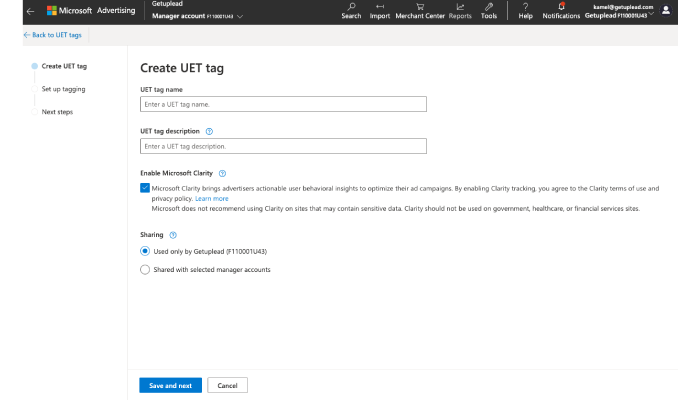
                    Here’s a step-by-step guide to setting up conversion tracking in Bing Ads:

                    1. Navigate to the ‘Conversion Tracking’ section on the left sidebar.
                    2. Select “Create UET Tag” and choose a name.
                    3. You can also add a description to the UET tag.
                    getuplead
                    1. Then select Save.
                    2. Copy the UET tag and paste it into the HTML of your website just before closing the head tag. If you’re using a tag manager, you can also add the UET tag through that platform.
                    3. Once the UET tag is installed, go back to Microsoft Ads and verify that the tag is working correctly. After verification, activate your conversion goal, and you’re all set to start tracking conversions!

                    Analyzing campaign performance

                    Once conversion tracking is in place, the next step is to dive into the data and analyze your campaign performance. Here are some of the most important metrics to keep an eye on:

                    • Click-through rate (CTR): CTR measures the percentage of people who click on your ad after seeing it. A higher CTR indicates that your ad is resonating well with your audience. If your CTR is low, it might be time to tweak your ad copy or targeting.
                    • Conversion rate: This metric shows the percentage of users who completed a desired action (conversion) after clicking on your ad. A high conversion rate indicates that your ads are driving quality traffic that’s likely to convert. If your conversion rate is lower than expected, consider optimizing your landing pages or adjusting your keywords.
                    • Cost per click (CPC): CPC is the amount you pay each time someone clicks on your ad. Monitoring CPC helps you manage your budget and ensure you’re getting a good return on your investment. If your CPC is high, try refining your targeting or bidding strategy.
                    • Return on ad spend (ROAS): It measures the revenue generated for every dollar spent on advertising. If your ROAS isn’t meeting your goals, it might be time to reassess your overall strategy.
                    Bing Ads analytics

                    Bing Ads offers a suite of analytics tools that can help you dig deeper into these metrics and more. 

                    • Campaign Performance Report provides a comprehensive overview of how your ads are performing
                    • Keyword Performance Report offers insights into which keywords are driving the most clicks and conversions. 
                    • Search Term Report to see the actual search queries that triggered your ads, helping you refine your keyword strategy further.

                    Whether it’s adjusting your bids, refining your keywords, or testing new ad copy, the insights gained from thorough analysis are invaluable in maximizing the effectiveness of your advertising efforts on Bing.

                    Advanced tips for Bing advertising success

                    Use features like remarketing and Bing Shopping Ads to elevate your campaigns.

                    Remarketing with Bing Ads

                    Remarketing is a powerful strategy that allows you to re-engage with users who have previously interacted with your website but haven’t yet converted. Bing Ads offers robust remarketing tools that can help you stay top-of-mind and encourage those users to return and complete their desired actions.

                    Setting up and optimizing remarketing campaigns is straightforward with Bing Ads. 

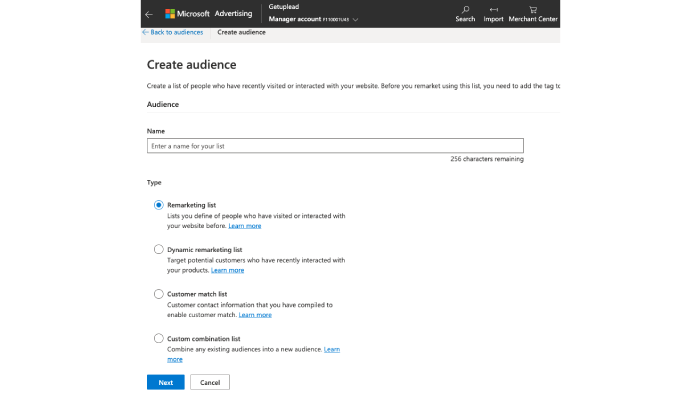
                    1. Head over to the ‘Shared Library’ in the left-hand menu.
                    2. Click on ‘Audiences,’ then hit ‘Create.’
                    3. Pick the audience type you want: remarketing list, dynamic remarketing list, customer match list, or custom combination list.
                    getuplead

                    Bing Ads allows you to create custom audiences by uploading a list of customer emails or phone numbers. You can even use LinkedIn profiles. 

                    You can then use this list to target users across the Microsoft Advertising Network. This feature is particularly useful for creating highly targeted campaigns aimed at specific customer segments, helping you deliver more relevant ads and improve conversion rates.

                    Exploring Bing shopping ads

                    Bing Shopping Ads offer a unique opportunity to showcase your products directly in search results. These ads display product images, prices, and other key details, making them highly effective at capturing attention and driving clicks.

                    Charlotte Davies

                    Setting up a Bing Shopping campaign begins with creating a Microsoft Merchant Center account, where you can upload your product feed.

                    Once your feed is uploaded and approved, you can create a Shopping campaign in Bing Ads by selecting your product categories, setting your bids, and defining your targeting options.

                    With these ads, you can display your products prominently in search results, driving high-intent traffic directly to your product pages and increasing your chances of conversion.

                    Case studies & success stories

                    With its comprehensive features, it’s no shocker that many find Bing to be a strong alternative, steadily closing the gap in customer satisfaction with industry giant Google.

                    The American Customer Satisfaction Index reports that Bing has achieved a respectable customer satisfaction score of 75 out of 100, bringing it closer to Google’s score of 80 out of 100. This trend is evident in various case studies, one of which you can learn from here:

                    Youi’s success with Microsoft Ads

                    Youi, a leading Australian insurance provider, aimed to test the effectiveness of Native ads in boosting their search campaign performance by connecting upper funnel activities to downstream conversions.

                    Youi partnered with Microsoft for a six-week campaign using Microsoft Audience Ads. By using Microsoft’s first-party data and collaborating closely with their account teams, Youi optimized the campaign with bid adjustments and tested advanced models like last-touch attribution.

                    The campaign doubled conversion volume in the final two weeks. Microsoft’s study also showed a 3.2X lift in brand consideration and a 3X increase in search conversions for those exposed to the Audience ads.

                    Wrapping up

                    The internet has become increasingly competitive, so it’s critical to explore every available avenue to maximize your advertising success. Throughout this guide, we’ve uncovered the underestimated potential of Bing Ads and why it deserves a spot in your strategy.

                    Now that you’re equipped with the knowledge to succeed with Bing Ads, it’s time to take action. Start by setting up your Bing Ads account, explore its features, and craft campaigns to reach untapped audiences. The sooner you start, the sooner you’ll see the benefits of diversifying your efforts.

                    FAQs

                    What are Bing Ads called now?

                    Bing Ads are now known as Microsoft Advertising. Same platform, just a new name to better reflect its broader offerings.

                    Are Bing Ads cheaper than Google Ads?

                    Generally, yes. Bing Ads tend to have lower costs per click (CPC) compared to Google Ads, which can stretch your advertising budget further.

                    Is Bing better than Google Ads?

                    It depends on your goals. Google Ads has a larger reach, but Bing Ads (Microsoft Advertising) offers lower competition and often cheaper clicks, making it a solid choice for certain niches.

                    What are Bing Ads good for?

                    Bing Ads are great for targeting an audience that’s slightly older, more affluent, and often less saturated with ads. Plus, if you’re looking for a cost-effective alternative to Google Ads, Bing is worth considering.

                    Are Bing Ads worth it?

                    Definitely! Bing Ads are worth it if you’re looking to diversify your advertising strategy and reach an untapped audience with less competition.

                    The post Are Bing Ads the Digital Advertising Underdog to Watch In 2024? appeared first on jeffbullas.com.


                    * This article was originally published here

                    Start making $100+ per day this week with the best dfy system - Subscribe here!


                    AI Made Everyone Better. Originality Became Scarce.

                    A while ago I read a draft I had written and did not recognise the person who wrote it. It was not bad. That was the problem. The se...